Your dashboard, card by card
What each Dashboard card shows, its time window, and where tapping it goes.
Also known as: home screen · overview · kpi · summary · tiles · widgets · at a glance · front page · main screen · numbers today
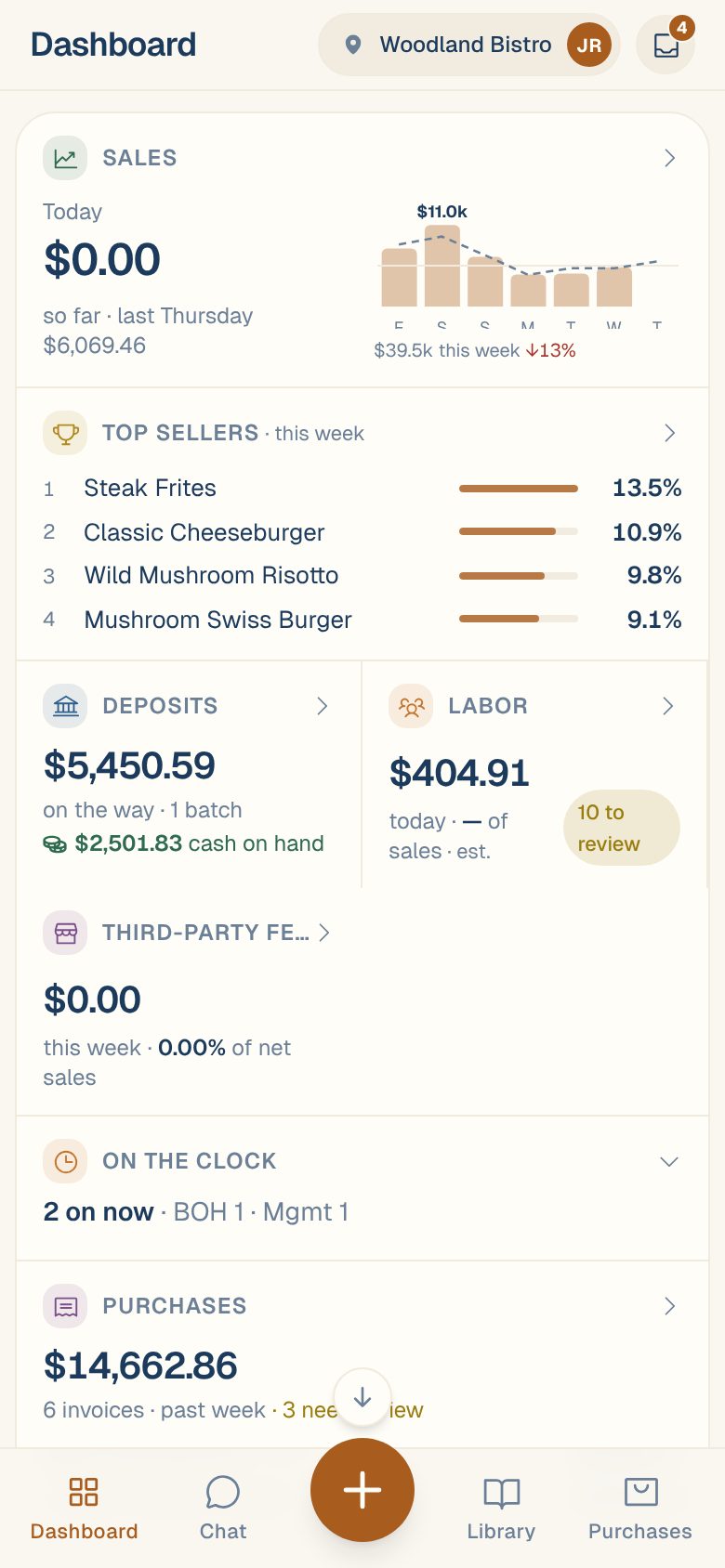
The Dashboard is the first screen you see. It shows one location at a time, as a stack of cards, so you can check the day in a few seconds. Tap a card’s title row to open the full screen behind it.
Sales and Labor aren’t tabs at the bottom of the screen. You reach them from their cards here.
Every card at a glance
| Card | What it shows | Covers | Tap the title to open |
|---|---|---|---|
| Sales | Today’s sales, compared with the same day last week, and a small chart of the last 7 days | Today and the last 7 days | Sales, Report tab |
| Top sellers | Your 4 best-selling items and each one’s share of the week’s sales | This week | Sales, Menu tab |
| Profit leaders | Your 4 most profitable dishes and their margin | This week | Sales, Menu tab |
| Deposits | Card money on its way to the bank, and when the next deposit is expected | Upcoming deposits | Sales, Deposits tab |
| Labor | Today’s labor cost and labor as a % of sales | Today | Labor Report, set to today |
| Third-party fees | What ordering apps charged you, and as a % of net sales | This week | Sales, Report tab |
| On the clock | Who’s clocked in right now. Tap to open the list in place | Right now | Opens in place |
| Purchases | What you spent, how many invoices, and the latest few | Past week | Purchases, Reports tab |
| Inbox | N to review, or All clear when nothing needs you | Right now | Inbox |
| Savings & Alerts | Yearly savings from cheaper options, and the number of price hikes | Ongoing | Savings |
| Business Compliance | Good standing, Renewals due soon or Needs attention | Right now | Business Compliance |
| Where your money goes | Ingredient spend by category, as a ring chart | Last 30 days | Library, Ingredients tab |
| Vendors | Your vendors by spend, with each one’s share | Last 30 days | Purchases, Vendors tab |
| Ingredients | Your top ingredients by spend, plus any price change since the last purchase | Last 30 days | Library, Ingredients tab |
“This week” starts on Monday. “Today” follows your location’s business day, so sales after midnight count toward the night before until your day ends. See Set your business day and timezone.
The title row is the link. The rest of a card can do its own thing: tap a bar on the Sales chart to see that day’s figures, or a slice of the ring chart to see that category’s top ingredients.
Cards that only show up sometimes
Top sellers and Profit leaders
Top sellers appears once your POS sends item-level sales. Profit leaders appears once your menu items are linked to recipes, so Maitaki can work out each dish’s cost. See Link recipes to menu items.
Deposits
Shows when this location has a card terminal or card deposits to track. Nothing pending — every settled batch is deposited. means everything has landed. If you track cash deposits, a green line shows your cash on hand. See Track card deposits.
Labor and On the clock
The Labor card is for Managers and up. It shows est. while people are still on the clock or salaries are included, and N to review when timesheet entries need a look. On the clock appears under it once a labor source is connected. See See who’s on the clock.
If your Labor card says Connect a labor source, see Labor says “Connect a labor source”.
Third-party fees
Shows only when an ordering app, such as DoorDash, counts in this location’s sales. See DoorDash and Slice fees and payouts.
What an empty card means
| You’ll see | What it means |
|---|---|
| No income source connected here yet | Connect your POS or card terminal, for example Clover or Toast. |
| No invoices in the past week | Nothing was scanned in the last 7 days. Photograph an invoice to get started. |
| Vendors appear here once invoices are scanned. | Vendor and ingredient cards fill in from your invoices. |
| Couldn’t load … check your connection. | Maitaki couldn’t reach the server. It isn’t saying you have no data. Check your signal and try again shortly. |
Common questions
The numbers are for the wrong restaurant.
The Dashboard shows the location in the pill at the top right (or under your name on a computer). See Switch between locations.
Why is today's sales change grey instead of green or red?
Early in the day, Maitaki shows so far with last week’s total for the same day, rather than judging a half-finished day. The up or down arrow appears in the evening.
How up to date is the Sales card?
When you open the Dashboard, Maitaki asks your POS for new sales if it’s been more than 15 minutes since the last update. See How often your sales update.