Invoice lines, products and ingredients
How a row on an invoice becomes a price for an ingredient.
Also known as: sku · item code · product code · vendor item · mapping · matched · item number · catalog · inventory item · how it works
Maitaki keeps three things apart: the line on an invoice, the vendor’s product, and your ingredient. Knowing how they connect explains where every price in your recipes comes from, and what to fix when one looks wrong.
The three, in plain words
| Thing | What it is | Example |
|---|---|---|
| Line | One row on one invoice, as printed | 2 cs CHICKEN BREAST BNLS SKNLS 4/10# @ $135.01 |
| Product | The vendor’s item, with its item number and pack. Every invoice from that vendor with the same item points to the same product. The app shows its number as SKU. | Prime Cut Meats, SKU PC30150, 4 × 10 lb per case |
| Ingredient | What you cook with. Many products, from many vendors, can be one ingredient. | Chicken Breast, priced per lb |
So a line belongs to a product, and a product feeds one ingredient. Recipes only ever use ingredients. They never see a vendor or an item number, so you can switch vendors without touching a recipe.
How it fits together
- An invoice comes in and each line is matched to the vendor’s product, by its item number or, when none is printed, by its name.
- The product already knows which ingredient it feeds and what’s in one case, so the line gets a price per pound, gallon or each.
- That price joins the ingredient’s price history. The latest trusted one becomes its current price. See Which price Maitaki uses for costing.
- Every recipe that uses the ingredient costs at that price.
A line from a product Maitaki hasn’t seen before is linked to an ingredient you already have, or a new one is made for it when the invoice is verified.
See it in the app
-
Tap Library. It opens on the Ingredients tab.
-
Tap an ingredient.
-
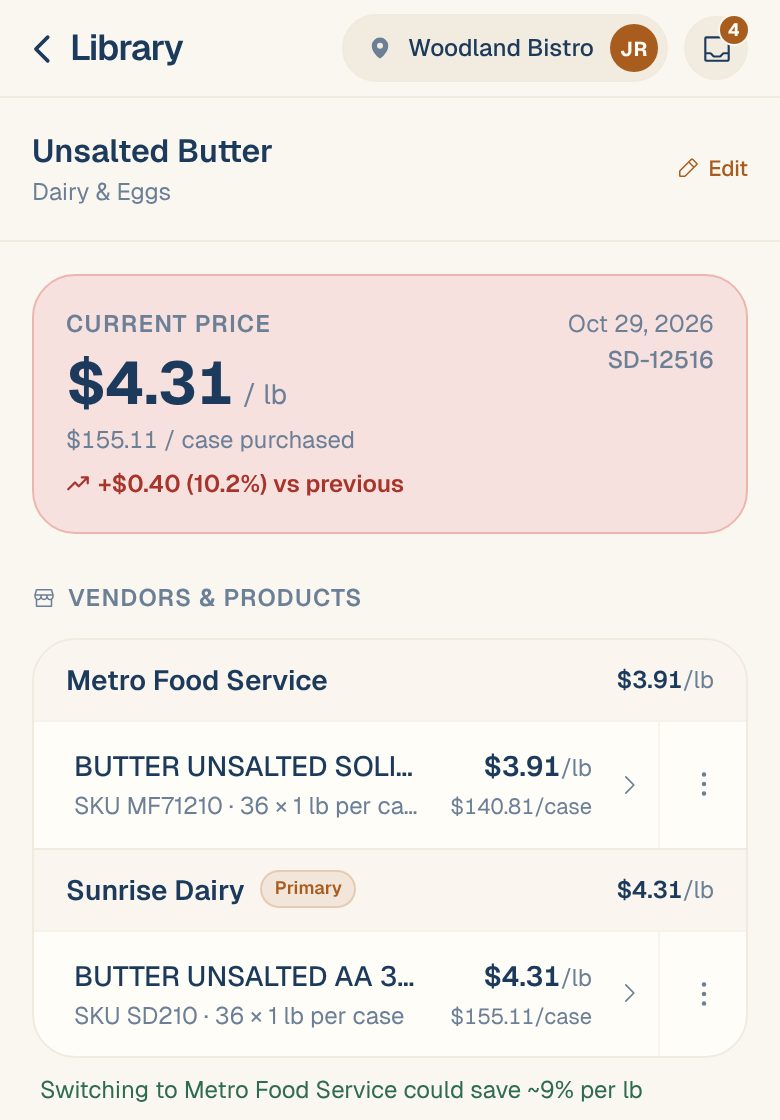
Under Vendors & products, you’ll see every product that feeds it, grouped by vendor, each with its SKU and pack.
-
Tap a product to open its own page: Part of the ingredient, its Current Price, its Pack, its own Price History, and the invoices it Appears on.
Each location keeps its own ingredients. To see another location’s, see Switch between locations.
When a link is wrong
| What’s wrong | What to do |
|---|---|
| A line on an invoice feeds the wrong ingredient | Link a line to the right ingredient |
| A product sits under the wrong ingredient | Move a product to another ingredient |
| You have two ingredients for the same thing | Merge duplicate ingredients |
| A product’s pack is wrong or missing | Set a product’s pack size |
A fix to a product reaches every invoice. Changing a product’s ingredient or pack updates all its lines, past and future, so you only fix it once.
Common questions
Why are two vendors' products under one ingredient?
Because they’re the same thing in your kitchen. Pooling them lets Maitaki compare what each vendor charges per pound and keep your recipe costs on the latest price, whoever you bought from.
Some products say "No SKU code".
That vendor doesn’t print item numbers, so Maitaki recognizes the product by its name on the invoice instead.
What does "New from invoice" mean in the Ingredients list?
Maitaki created that ingredient when it verified an invoice for you. Check its name and category, and merge it if you already had one. See Merge duplicate ingredients.