Set your payroll period
Tell Maitaki how often you run payroll, weekly, every two weeks, twice a month or monthly, so salaries and bonuses are costed the way you pay them.
Also known as: pay cycle · pay schedule · biweekly · fortnightly · semi-monthly · pay period · payroll dates · pay week · payroll frequency
Your payroll period is how often you pay your staff. Maitaki uses it to spread salaries and recurring bonuses across the days of each period, so every period adds up to what payroll pays. Report date pickers also get a Payroll period choice.
Each location has its own payroll period. Until it’s set, you can’t add recurring bonuses there.
Set it up
-
Open the account menu (your location and avatar, top right on a phone; bottom left on a computer) and tap Settings.
-
Tap your location. Under Basics, tap Payroll period. If it isn’t set yet, you’ll see Set up next to it.
-
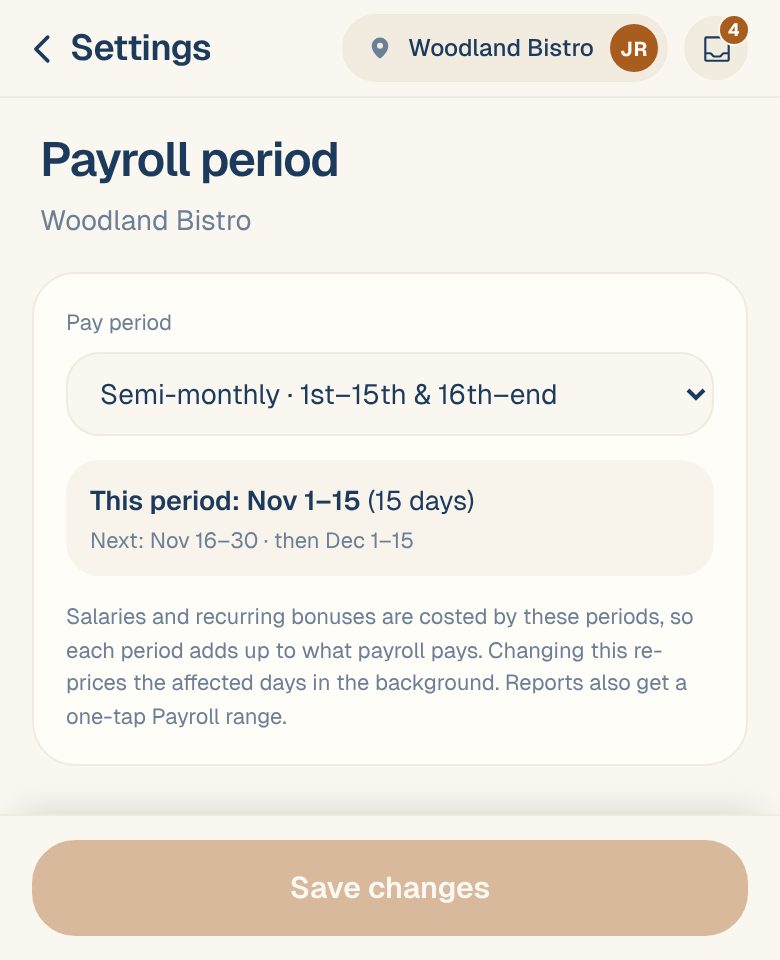
Choose a Pay period:
Option When it runs Weekly Every 7 days. Also choose Week starts on. Bi-weekly Every 14 days. Also pick Any period start date, any day one of your pay periods began. Semi-monthly · 1st–15th & 16th–end Twice a month, always on those dates. Monthly · 1st–end of month Once a month. -
Check the preview. It shows This period with its dates and number of days, and the next two periods.
-
Tap Save changes.
You’ll see Saved — labor costs are being updated. Maitaki re-prices the affected days in the background, so salary and bonus figures can take a little while to settle.
Match your real payroll. If the preview’s dates don’t line up with your last pay stub, check the start day or start date before you save.
Common questions
What does it change if I don't have anyone on a salary?
Hourly costs don’t change. You still get the Payroll period choice in report date pickers, and you can add recurring bonuses.
Can I change it later?
Yes. Changing it re-prices salaries and bonuses on the affected days, past ones included.
The options are greyed out.
Only Managers, Admins and Owners can change the payroll period. Everyone else can see it but not change it.