Expected cash, short and over
What Maitaki expects in the bank bag each day, how a slip is checked against it, and why the two can differ.
Also known as: over short · cash short · cash over · drawer count · variance · missing cash · cash discrepancy · till short · overage · shortage · cash variance
With cash deposit tracking on, Maitaki works out how much cash each day should send to the bank. When you add a deposit slip, it compares the two to the cent. Any gap shows as short or over, so you can find out why while the day is still fresh.
See how a day’s cash adds up
- Open Sales from your Dashboard, then tap the Sales tab.
- Tap a day and scroll to Cash · expected deposit.
You’ll see each line that makes up the day’s expected cash, then the Expected deposit. With Toast, the next line is what was Recorded in Toast at close. Below that, In the bank shows what deposit slips have covered, and Still to deposit, Short, Over or Matched shows where the day stands.
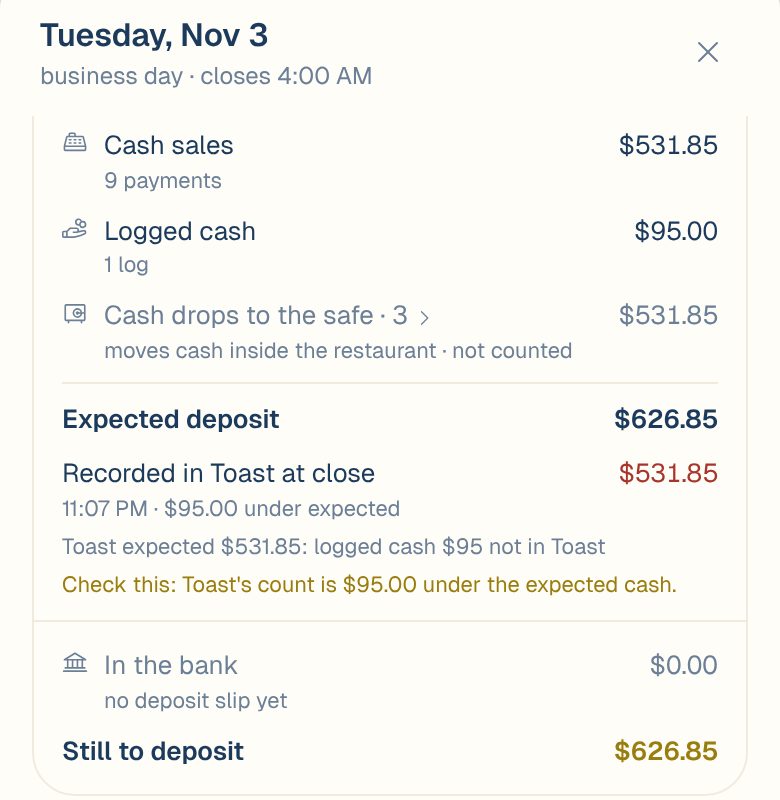
When Toast’s count at close isn’t the same as the expected cash, a Check this line tells you by how much. The line above it often says why. In this example, $95.00 of cash was logged in Maitaki but never rung in Toast.
For what goes into expected cash, see Track cash deposits.
What each day shows
| You’ll see | What it means |
|---|---|
| waiting | Closed, with cash still to take to the bank. |
| part deposited | A slip covered some of it. The rest is still waiting. |
| deposited | Slips covered it exactly, to the cent. |
| short $20.00 | Less went in the bank than expected, and the day is closed with a reason. |
| over $20.00 | More went in the bank than expected. |
| today · open | The day hasn’t closed yet. |
| no cash | No cash to deposit for this day. |
| before tracking | Before your Track cash from date. |
Each slip on the Cash tab also shows matched, short or over against the days it covers. With Toast, a slip can also show = Toast: it holds exactly what Toast counted at close, and any gap is between Toast’s count and the cash taken.
Why a day comes out short or over
- The drawer was miscounted at close, so the bag didn’t hold what was taken.
- Cash was paid out and not entered in the POS, such as a supplier paid from the drawer.
- Some of the float went in the bag, or the bag topped up the float.
- Cash was logged in Maitaki but not rung in the POS. It’s part of expected cash, so it needs to go in the bag too.
- Driver reimbursements follow your cash rule. If drivers are paid from the drawer but the rule says otherwise, expected cash will be off by those amounts.
- The slip covers the wrong days. Open the slip and tap Edit split to fix it. See Add a deposit slip.
Give a reason
When you save a slip’s best match and it leaves a day short or over, Maitaki saves a reason with that day. Where Toast’s count at close explains the gap, it uses Counted short at close or Counted over at close. Otherwise it uses Miscount or Extra in the bag.
To change it:
- On Deposits, tap the Cash tab, then the slip.
- Next to the day, tap change (or add a reason).
- Pick a reason: Counted short at close, Counted over at close, Miscount, Kept for float, Change order, Extra in the bag, Bank error or Other.
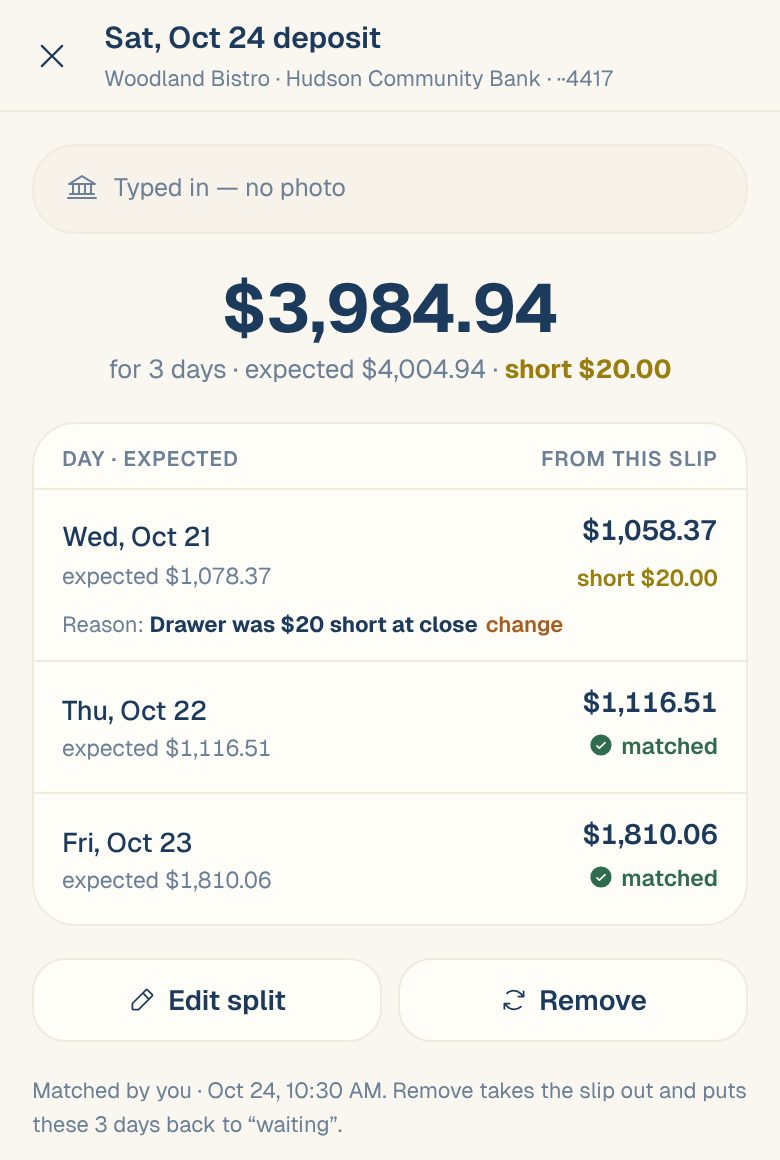
You can change reasons on a slip you saved in the last 10 minutes. After that, a Manager or above can.
Common questions
Is a few cents off really short?
Yes. A day only counts as matched when the slip equals expected cash to the cent. Anything else shows the exact difference, so small gaps don’t hide.
The slip covers three days. Which day gets the difference?
The day your POS’s count at close explains it, if there is one. Otherwise the last day on the slip. To move it, open the slip and tap Edit split.
A day says part deposited, but all the cash went in.
The slip didn’t cover the whole day. Either the rest is on another slip that hasn’t been added yet, or the day came in short. Add the missing slip, or open the slip and give the day a reason.