Ask Maitaki a question
What Chat can answer, with example questions to try.
Also known as: ai · assistant · chatbot · help me · ask a question · what can i ask · prompts · examples · query · labour
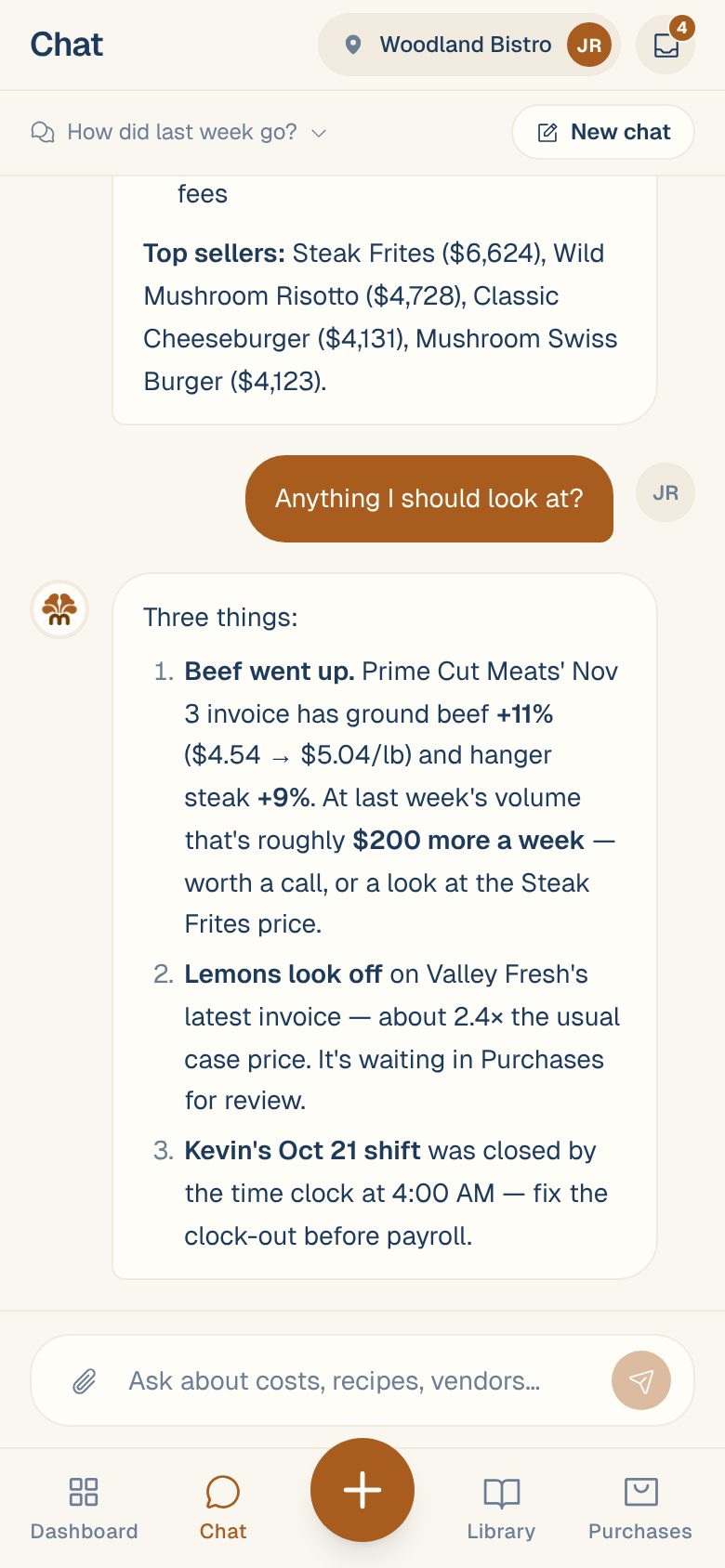
Chat answers questions about your restaurant from your own data: sales, invoices, prices, recipes, labor and cash. Ask the way you’d ask a sharp manager, and Maitaki looks it up and replies in a few lines.
Ask a question
- Tap Chat at the bottom of the screen.
- Type your question in the box that says Ask about costs, recipes, vendors…
- Tap send.
Maitaki shows what it’s checking while it works, then writes the answer. Names of ingredients, recipes, invoices, menus and vendors in the answer are links: tap one to open it. When you compare two periods, you also get a chart with a button to the matching report.
Chat answers about the location you have open. To ask about another one, switch location first. See Switch between locations.
Ask a follow-up. Maitaki remembers the conversation, so “and the week before?” or “why is that one flagged?” works without repeating yourself.
Questions to try
Sales
- How did we do last week?
- How were sales yesterday compared with the same day last week?
- What were our busiest hours on Saturday?
- What were our top sellers this month?
- How much came in by card, cash and DoorDash this week?
- Who rang the most sales last night?
- How much did each server make in tips yesterday?
- This month vs last month?
- Which card deposits are still on their way to the bank?
Purchasing and prices
- How much did we spend on produce this week?
- Which vendors did we spend the most with last month?
- What’s the price history of ground beef?
- Which prices went up the most in the last 30 days?
- Is another vendor cheaper for anything we buy?
- Which prices look wrong on our invoices?
- What pack info is missing?
Invoices
- Which invoices can I verify?
- What needs fixing before I can verify the rest?
- Show me the last invoice from Prime Cut Meats.
For “which invoices can I verify?”, Maitaki groups them and offers cards that verify a batch for you once you approve. See Approve or discard what Chat suggests.
Recipes and menus
- What’s the food cost on the Wild Mushroom Risotto?
- What’s on the dinner menu, and at what prices?
- Write me a recipe for a roasted tomato soup.
- Add the risotto to the dinner menu at $24.
- Make me a brunch menu from our recipes.
New recipes and menus come as a card you approve. See Draft a recipe with Chat.
Labor (Managers and up)
- What was our labor % last week?
- Labor this pay period vs last?
- How much overtime did we pay this month?
- Who cost the most in labor last week?
- Lunch vs dinner labor this week?
- Any timesheet issues this period?
- Is payroll ready?
- What if we gave the kitchen a $1 raise?
Cash
- Add these to the cash log: Mon $412, Tue $388, Wed $455.
- How much cash should I deposit?
The first needs Manual Cash Logging turned on, and the second needs Cash deposits turned on, both in your location’s settings. See Log cash sales.
You can also attach a photo, PDF or spreadsheet and ask about it. See Send a document through Chat.
What Chat can and can’t do
- It reads your data and answers. Every number comes from your sales, invoices, timesheets and recipes. If there’s nothing to go on, it says so.
- It never changes anything on its own. When it can help, like fixing a line or creating a recipe, it shows a card, and nothing is saved until someone taps to approve.
- It answers with your role. Labor and pay answers are for Managers and up. If you ask without that access, Maitaki tells you.
Common questions
Can my team see what I ask?
Yes. Chats are shared with everyone at the location, with each person’s name and picture on their messages. See Manage your chats.
Can I leave while it's answering?
Yes. The answer keeps going, and it’s there when you come back. If an answer stops part way, you’ll see Cut off with a Tap to retry button. See Chat stopped or shows an error.
Can I ask from Telegram?
Yes. Link your Telegram and ask the Maitaki bot in a private chat or your team group. See Use the Maitaki bot.