Fix a missed clock-in or clock-out
Why a shift shows as incomplete or auto-clocked-out, and how to fix it at the source so hours and cost are right.
Also known as: forgot to clock out · missing punch · open shift · wrong hours · forgot to punch in · auto clock out · didn't clock out · edit punch · fix timecard · correct hours
When someone forgets to clock in or out, their shift has only one end. Maitaki can’t know how long they worked, so it flags the shift and leaves its hours out until the time is fixed in your time clock.
How you’ll spot it
- A timesheet flag: Missing clock-out, Missing clock-in, Auto-clocked-out or Unusually long shift.
- In the list of flagged shifts, open or no clock-in in red where the time should be.
- On the Timesheet, no in in the time card, and — for that shift’s hours and cost.
- On a single day’s Timeline, a red box above the chart, like 1 incomplete shift, naming the person and the time that’s missing.
Someone working right now isn’t a missed clock-out. Today’s open shifts show as on the clock, with an estimate so far. See See who’s on the clock.
When the time clock clocked them out
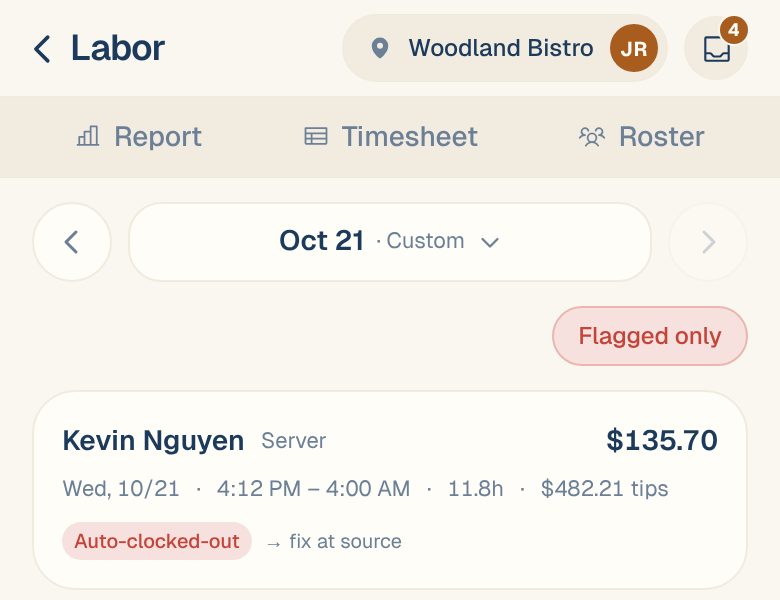
Many time clocks end open shifts on their own at a set time. That’s normal at close, when someone clocks straight back in. When it isn’t normal, for example a shift ending at 4:00 AM long after everyone left, it’s flagged Auto-clocked-out. The hours are counted, but they’re probably too many.
A shift at or over your long-shift limit, 14 hours unless you’ve changed it in labor rules, is flagged Unusually long shift for the same reason.
Fix it at the source
Maitaki reads your timesheets and never changes the times. Fix the shift where it was recorded:
- Find out when the person really started or left. Ask them, or check when they closed their last check.
- Correct the time:
- Toast: edit the shift’s time entry in Toast. The change syncs back to Maitaki.
- A timesheet file: correct the file and import it again.
- The Timesheet API: send the corrected shift from your time-tracking system.
- Open the Timesheet for that day in Maitaki and check the shift.
Once the corrected shift comes in, its hours and cost count again, the flag clears, and the shift shows Edited with what it was before. See See every change to a shift.
Common questions
Can I type the right time into Maitaki?
No. Maitaki keeps your time clock’s record as it is, so there’s only one version of each shift. Correct it in your time clock.
Does a missing clock-out make my labor cost too low?
Yes, until it’s fixed. A shift without both times isn’t counted, so that day’s labor and labor % read low. An auto-clocked-out shift is the opposite: it usually counts too many hours.
I fixed it in Toast, but Maitaki still shows the old time.
The change comes in with Maitaki’s next sync from Toast. Check again later. If it still hasn’t changed the next day, contact support.