Look up a transaction
Find a receipt or card charge, see what was ordered, and get the card details and codes you need for a dispute.
Also known as: receipt lookup · find a receipt · chargeback · dispute · auth code · rrn · last four digits · card number · customer complaint · check number · order lookup · split check · split bill
When a guest disputes a charge or asks about their bill, you can find the transaction in Maitaki and see everything your POS and card terminal recorded about it.
Find it
- Open Sales from your Dashboard (see Find your sales), then tap the Sales tab.
- Tap the day it happened.
- Scroll the list to the time of the sale. Each line shows the time, the receipt number or card, the payment type and the amount.
- Tap it.
Know the server? On a day with two or more servers, tap their name above the list to show only their sales.
When a location has both a POS and a card terminal, a receipt and its card charge appear as one card. The receipt is on top and the charge under it, joined by a link with a green ✓ when they agree. A receipt with no charge, or a charge with no receipt, has a red edge.
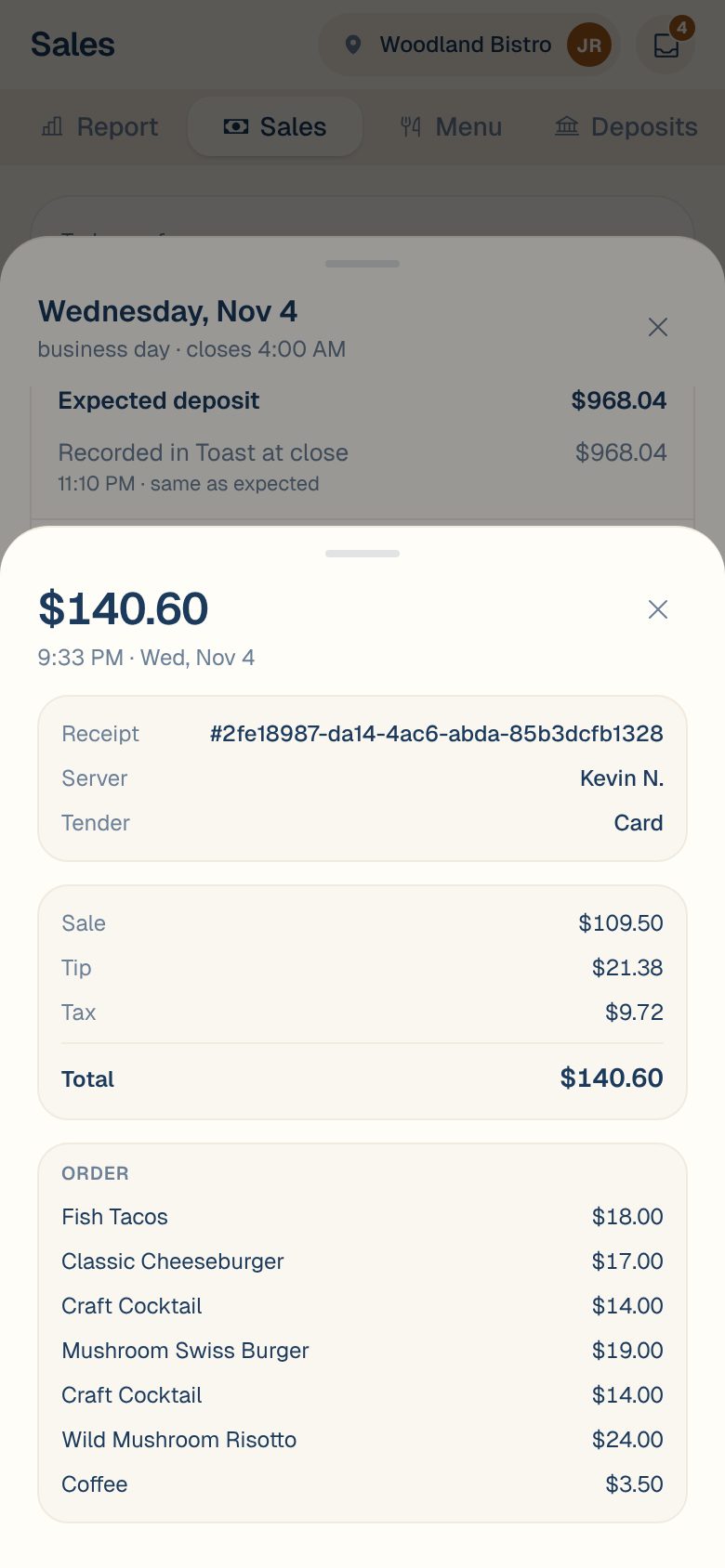
What a POS receipt shows
| Part | What’s in it |
|---|---|
| Top | The total, and the time and date. |
| Receipt | The receipt number, the Server if your POS recorded one, each payment and its amount, and Dining (like dine-in or takeout) if known. |
| Money | Sale, Tip, Tax, Refunded and Total. |
| Order | Each item and its price. |
What a card charge shows
| Part | What’s in it |
|---|---|
| Top | The total, the time and date, and settled with the batch number, or pending if the batch hasn’t closed. |
| Card | The card brand, last four digits and type, how it was entered, the issuing Bank, the Terminal and the Server if recorded. |
| Money | Sale, Tip, Tax (in sale) or Includes ≈ estimated tax, Refunded and Total. |
| For disputes | The Auth code and Reference (RRN). Your processor asks for these when you answer a chargeback. |
When the receipt and charge are matched, tap Matched to the card charge — view it (or Matched to the POS receipt — view it) to jump to the other side.
Common questions
A transaction has a red banner at the top.
It didn’t take any money, so it doesn’t count toward the day. The banner says why: it was declined, cancelled, voided or reversed.
I can't find a sale I know happened.
Check the day before or after. A sale after midnight counts toward the night before, and some POS rules put a sale on a different day. See Which day does a sale count on?
The receipt says "No line items on this receipt."
Your POS sent the payment but no items for it. The amount still counts.