See what changed in Activity
A timeline of who did what at your location, and what Maitaki did on its own.
Also known as: history · audit log · who changed · recent changes · timeline · log · audit trail · changelog · who did it · what happened · feed
Activity is a running list of what’s happened at your location: invoices uploaded and verified, prices that went up, vendors added, pay and tax changes, and more. It shows who did each thing, whether that’s a teammate, you, or Maitaki itself.
Everyone can open Activity, whatever their role.
Open it
- Open the account menu (your location and avatar, top right on a phone; bottom left on a computer).
- Tap Activity.
Activity shows the location you’re in. To see another location’s, switch to it first. See Switch between locations.
It updates on its own while it’s open.
Read the timeline
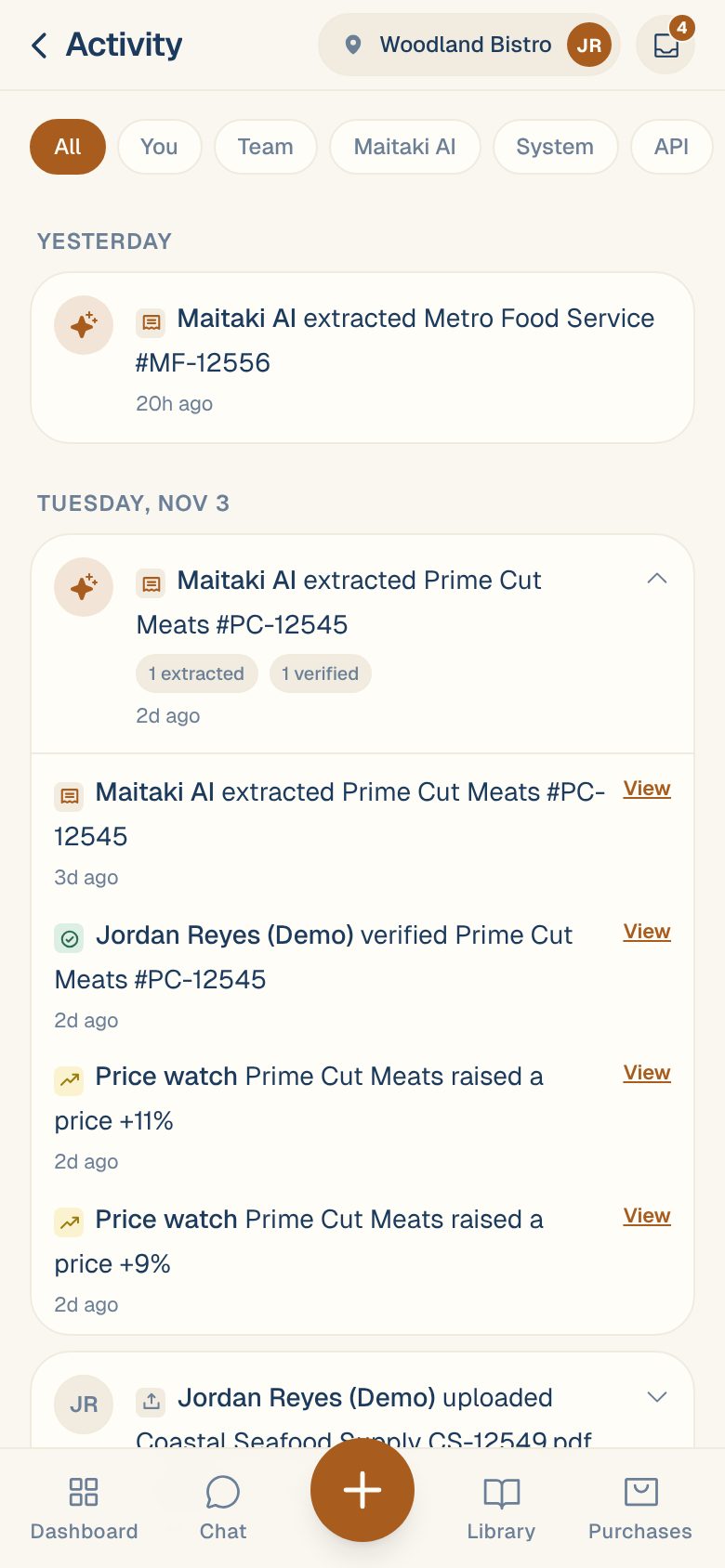
Events are grouped under Today, Yesterday, or the date. Each line starts with who did it, then what they did, for example “Sam uploaded Valley Fresh VF-12477.pdf” or “Price watch Prime Cut Meats raised a price +11%”.
An upload becomes one card with everything that followed it. Chips sum it up, like 1 extracted, 1 verified or 1 duplicate. Tap the card to open the full story, then tap View next to any line to open that invoice, file or ingredient.
Filter by who did it
Tap a chip at the top:
| Filter | Shows |
|---|---|
| All | Everything, except timesheets sent in through the Timesheet API. |
| You | What you did. |
| Team | What everyone else at the location did. |
| Maitaki AI | What Maitaki did on its own, like reading an invoice or splitting a PDF into several invoices. |
| System | Automatic changes, like a price rise spotted from an invoice. |
| API | Timesheets your time-tracking system sent. See Send timesheets with the Timesheet API. |
If nothing matches, you’ll see Nothing matches this filter.
Common questions
Why doesn't it show how much someone's pay changed?
Everyone at the location can see Activity, so pay changes show who changed whose pay, but never the amount. Managers can see the details on the person’s page in Labor.
Why don't I see someone being added to the team?
Changes to members and invites belong to the whole organization, not one location, so they rarely show here.
A held timesheet shows in Activity. How do I review it?
Support content coming soon. Email support@maitaki.ai and we’ll walk you through it.
It says "Couldn't load activity."
Check you have a signal, then leave Activity and open it again.