Open the Labor screens
Labor opens from your Dashboard. Inside are three tabs, Report, Timesheet and Roster, for Managers, Admins and Owners.
Also known as: labour tab · where is labor · staff costs page · payroll section · wages screen · labor missing from menu · staffing · crew cost
Labor isn’t one of the tabs at the bottom of the screen. You open it from the Labor card on your Dashboard, and three tabs along the top take you around.
Open Labor from the Dashboard
- Tap Dashboard.
- Tap the Labor title at the top of the Labor card. It opens the Report tab for today.
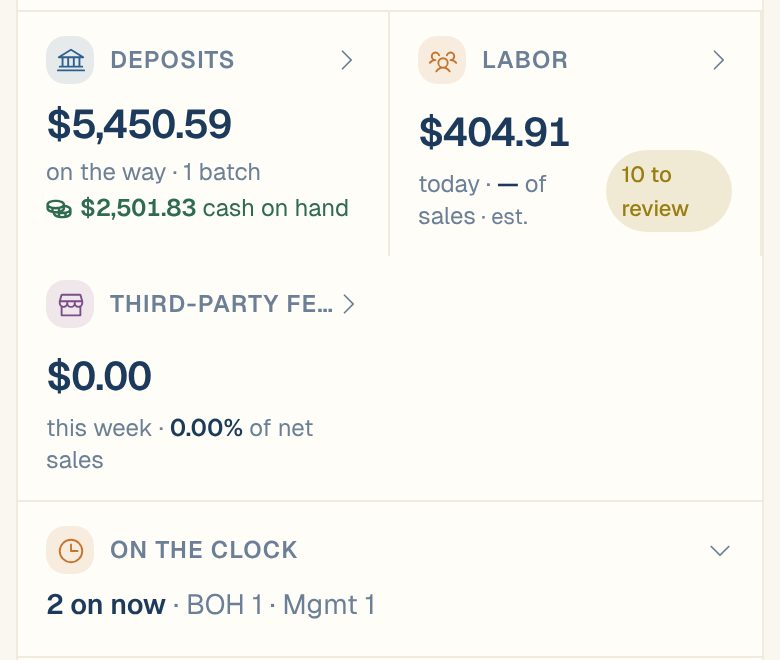
The Labor card shows today’s labor cost and its share of sales. est. means part of the figure is an estimate, because someone is still on the clock or a salary is spread into the day. N to review counts open timesheet flags.
Under it, On the clock shows who’s working right now. Tap it to open the list. See See who’s on the clock.
You can also get to Labor from Sales: on the Report tab, tap the Labor (labor %) card.
The three tabs
| Tab | What’s on it |
|---|---|
| Report | Labor cost and labor % of sales for any dates, with a trend chart and breakdowns by department, role and person. See Read the Labor report. |
| Timesheet | Every shift, by person, day or department. Read-only. See Use the Timesheet. |
| Roster | Everyone on staff, their department and their pay. See Your roster. |
There’s one more screen, the list of flagged shifts. It isn’t a tab: tap To review on the Report to open it. See Review timesheet flags.
Who can see labor
Labor shows pay, so only Managers, Admins and Owners can see it. If the Labor screens say No labor source connected, see Labor says “Connect a labor source”.
Common questions
How do I get labor into Maitaki in the first place?
A Manager or above connects a labor source in Settings → your location → Labor. You can connect Toast, import a timesheet as a CSV, or send timesheets with the Timesheet API.
Can I fix a shift from the Labor screens?
No. Times come from your time clock, and Maitaki only reads them. Fix a shift where it was recorded, and the change comes back to Maitaki. See Fix a missed clock-in or clock-out.
I have more than one location. Whose labor am I seeing?
The location shown at the top right. To see another one, switch locations.