Search, filter and sort invoices
Find an invoice by vendor, date, amount or number.
Also known as: find invoice · search by amount · invoice number · sort by vendor · look up bill · lost invoice · where is my invoice · invoice list · inv no
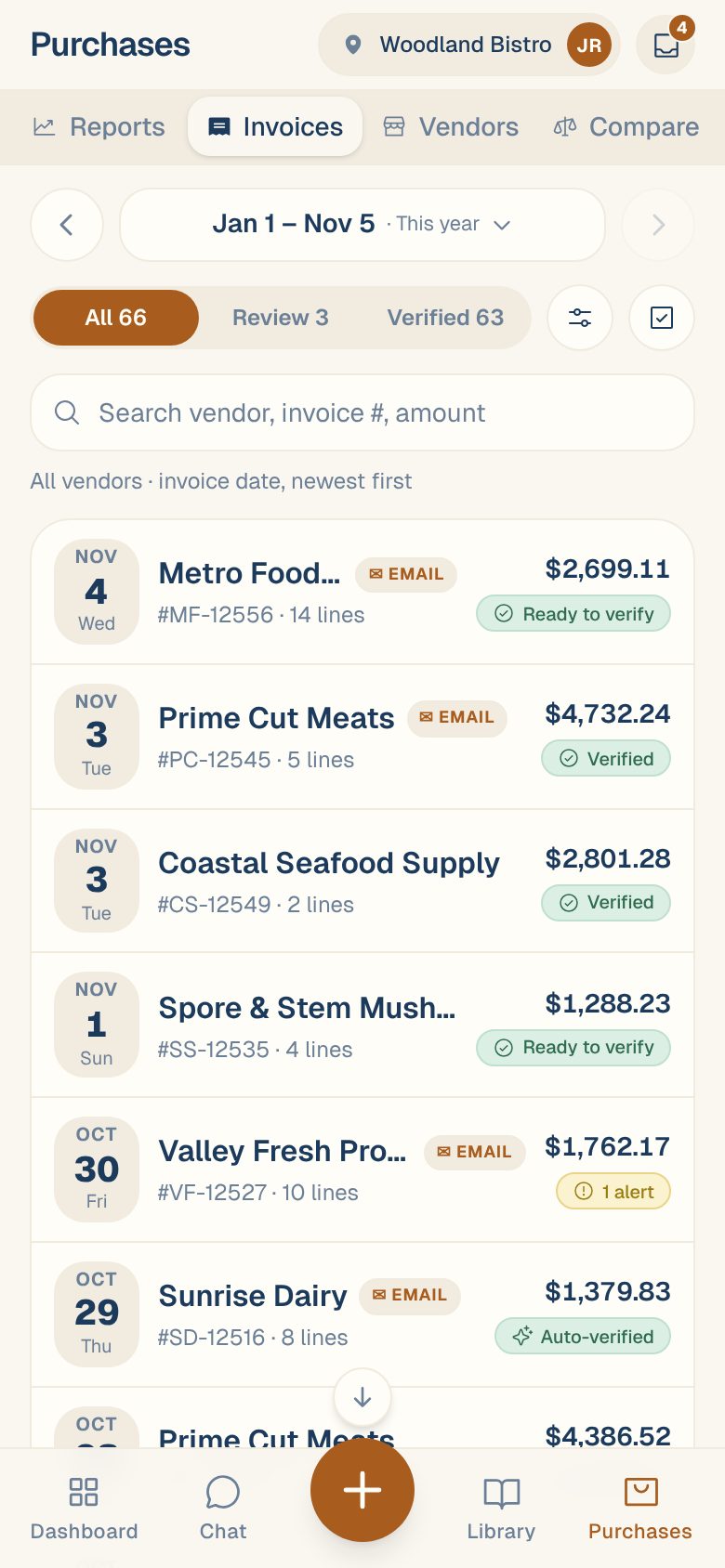
Every invoice for your location is in Purchases → Invoices. The list starts with this month, newest first. You can change the dates, search across everything, or narrow it to one vendor.
Search for one invoice
- Tap Purchases, then the Invoices tab.
- Type in Search vendor, invoice #, amount. A vendor name, part of an invoice number or an amount like 412.50 all work.
Search looks across all your dates, not only the range at the top. You’ll see Searching all dates under the box while it does. Tap ✕ in the box to clear it.
Change the dates
Tap the date range at the top to pick another one, like Last month or This year, or step back and forward with the arrows. The list shows invoices by the date printed on them, not the day you uploaded them.
An invoice with no date shows NO DATE in red and stays at the top of every range until someone dates it. It doesn’t count toward your spend until it has one. See Change an invoice’s vendor, number, date or total.
Show what needs review
The three tabs under the dates split the list:
- All: everything in the range.
- Review: invoices waiting to be verified.
- Verified: invoices someone, or Maitaki, has verified.
Filter, group and sort
Tap Filter (the button with sliders) to open these choices, then tap Show N invoices:
- Group by vendor: a section per vendor with its total.
- Vendors: keep All vendors on, or turn it off and pick the vendors you want. Each shows how many invoices it has in the range and what you spent.
- Sort by: Invoice date · newest first, Invoice date · oldest first, Recently uploaded, Amount · highest first or Vendor · A–Z.
A number on the Filter button tells you how many of these you’ve changed. Tap Reset in the sheet to go back to the usual view.
Can’t remember when it arrived? Sort by Recently uploaded. Each row then also shows when it was added, like added 2h ago.
Read a row
Each row shows the date, the vendor, the invoice number, how many lines it has and the total. You may also see a tag next to the vendor:
| Tag | What it means |
|---|---|
| Credit | A credit memo from the vendor. See Credit memos and returns. |
| Possible dup | It might be a copy of one you already have. See Duplicate invoices. |
| It arrived by email. |
And one status on the right:
| Status | What it means |
|---|---|
| Ready to verify | Every check passed. It’s waiting for someone to verify it. |
| N alerts | Some checks didn’t pass. Open it to see which. |
| To review | Waiting for review. |
| Verified | Someone on your team verified it. |
| Auto-verified | Maitaki verified it for you. |
Common questions
I uploaded an invoice but it isn't in the list.
It may still be being read, or it may be waiting in the Inbox to be sorted. Check the Inbox first. See What happens after you upload. If it does show but in the wrong month, the date was probably read wrong: search for it, open it and fix the date.
Can I see every invoice from one vendor?
Yes. Tap Filter, turn off All vendors, turn on that vendor, and tap Show N invoices. Widen the dates at the top to go further back. Their vendor page also lists them. See Your vendor page.
Searching an amount finds too many invoices.
Search matches any total that contains the digits you type. Type the full amount with cents, like 1250.40, to narrow it down.