Upload a vendor's order guide
Send a price list through Chat to fill in pack sizes and prices.
Also known as: price list · catalog · catalogue · vendor sheet · pack sizes · order sheet · product list · spreadsheet prices · price sheet · case sizes
A vendor’s order guide lists everything they sell, with pack sizes and prices. Many invoices don’t print what’s in a case, so Maitaki can’t work out a price per pound or per each. The order guide fills that in for every invoice from that vendor. It also lets Compare show their prices for things you haven’t bought from them yet.
Order guides are uploaded through Chat, as a PDF, photo or spreadsheet.
Upload it
-
Tap Purchases, then the Vendors tab, then the vendor.
-
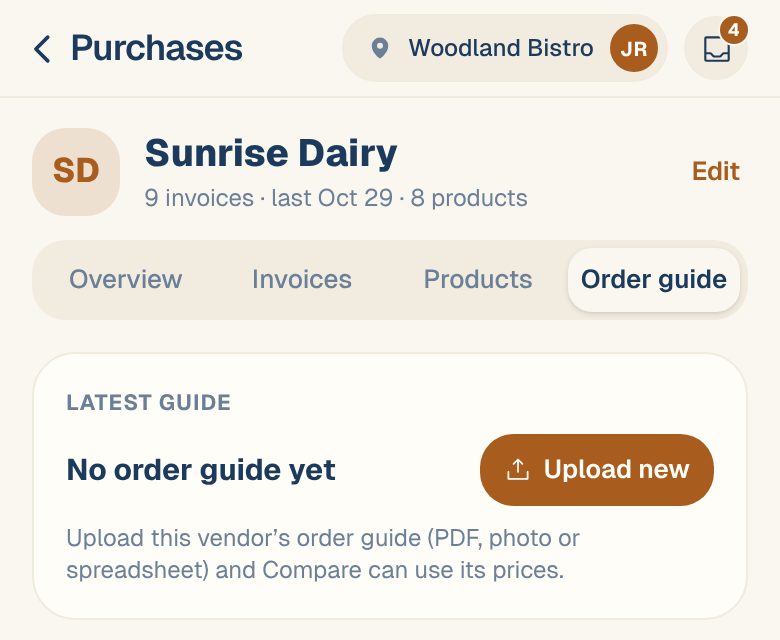
Tap the Order guide tab, then Upload new.
-
Chat opens with a message started for you, like Here is Sunrise Dairy’s order guide.
-
Tap the paperclip, then choose Take a photo, Choose from gallery or Choose a file (PDF, Excel, CSV).
-
Tap send.
You can also start from Upload order guide on the Compare tab, or from a note on an invoice or vendor page that says lines have no pack printed. Both open Chat the same way.
Review what Maitaki found
Maitaki reads the guide and replies with a card marked Proposed — pack info updates, for example 12 pack updates + 30 new SKUs · Sunrise Dairy.
- Tap Review & approve.
- For each item, check the pack Maitaki read. The sheet asks What does one unit you buy contain? Tap an item to change it, or untick it to leave it out. Check match means Maitaki isn’t sure it matched the right product.
- Items you haven’t bought yet are listed under Add 30 new SKUs to the catalog. Leave them ticked so future invoices with those items match and price straight away.
- Tap Apply 42 selected (for example) to save them.
Nothing changes until you apply. Tap Discard on the card if the guide was read wrong.
If the card says Approve the vendor first, Maitaki doesn’t know this vendor yet. Approve the card marked Proposed — new vendor in the same chat first, then review the guide.
What it fills in
- Pack sizes for that vendor’s products, so invoice lines that showed Needs pack can be priced. Past invoice lines for those products are re-priced too.
- New products from the guide, which show on the vendor’s Products tab as Never purchased until you buy them.
- Prices that Compare can use. Compare counts a guide’s prices until the guide is 30 days old. See Compare prices across vendors.
See past guides
The vendor’s Order guide tab shows the Latest guide, how old it is, and every upload under Uploaded guides, newest first. Each shows how many items changed since the one before: new, dropped and price changes.
- View opens it. Switch between What we read and Original file.
- Compare with previous shows only what changed since the last upload of the same list.
Send a fresh guide every month. Once a guide is over 30 days old, Compare still shows its prices but stops counting them in your savings.
Common questions
Does an order guide change my ingredients?
No. A guide only adds products and pack sizes for that vendor. Your ingredients are still matched from your invoices.
I don't see Upload new.
You have Viewer access, which can look but not add. Ask an Owner or Admin to change your role.