Scan a menu from a photo or PDF
Photograph your printed menu or upload the PDF. Maitaki reads the sections, dishes and prices, and you check them before anything is created.
Also known as: upload menu · photograph menu · menu pdf · import menu · digitize menu · digitise · menu photo · take picture of menu · read my menu · copy menu
If you already have a printed or PDF menu, you don’t need to type it in. Scan it, and Maitaki reads each section, dish, price and add-on into a draft. You fix anything it got wrong, then create the menu.
Scan it
-
Tap the round + button at the bottom of the screen, then Scan Menu.
-
Pick how to add it: Choose from your photos, Scan with camera or Upload PDFs.
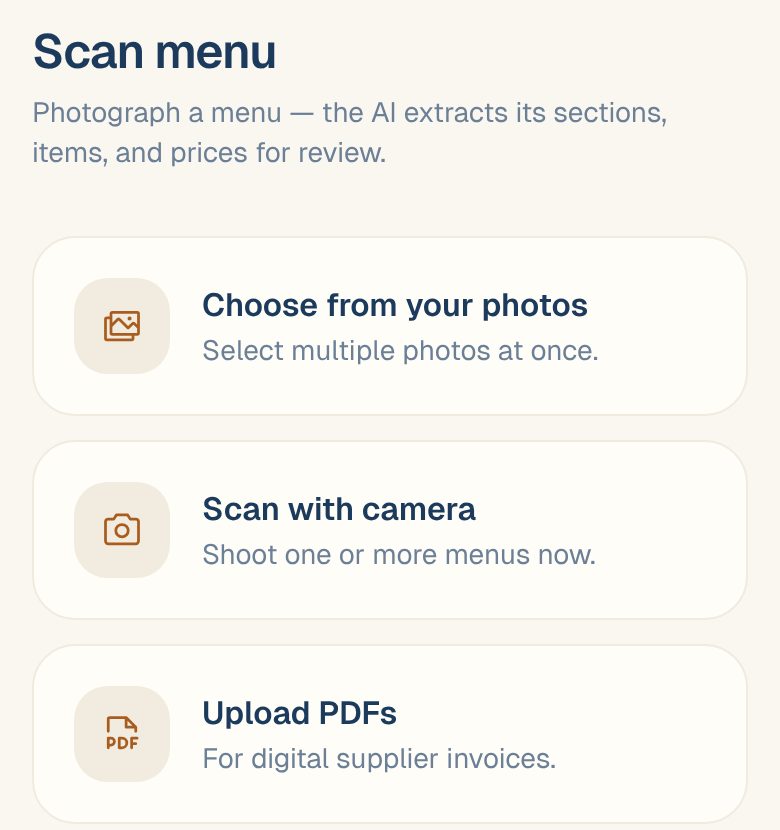
-
If your menu runs over several photos, leave Pages of one menu on so they become a single menu. Turn it off if each photo is a different menu.
-
Tap Upload & scan.
Maitaki takes you to the Inbox while it reads the menu. You can carry on using the app.
Photograph each page flat and square, with every price in view. A price that’s cut off or in shadow comes through blank.
Check what was read
- In the Inbox, open the menu once it’s been read.
- Tap Open in Library. You’ll see Review scanned menu, with the note Nothing is created until you confirm.
- Check the Menu name, each section name, and each dish’s name and price. Tap any of them to change it.
- Remove anything you don’t want with its trash icon. Remove an add-on with the × on it.
- Tap Create menu. The button shows how many dishes will be created.
Add-ons on the printed menu are created with their dishes.
Next: link each dish to its recipe
A scanned menu knows your dishes and prices, but not what goes into them. Link each dish to its recipe so Maitaki can work out its food cost and margin. See Link recipes to menu items.
Common questions
It says "The scan failed".
Tap Retry scan. If it fails again, retake the photos flat and in good light, or upload the PDF instead.
A dish came through with no price.
Its price box shows —. Type the price in before you tap Create menu.
Can I scan a recipe the same way?
No. Recipe photos and PDFs aren’t read into recipes. To get a recipe in without typing every line, describe it in Chat. See Draft a recipe with Chat.