Send timesheets with the Timesheet API
Create an API key so your time-tracking system can send timesheets to a location on its own. For whoever runs that system.
Also known as: api key · integration · developer · push timesheets · automatic sync · webhook · time clock api · it person · token
The Timesheet API lets your time-tracking system send timesheets straight to a location in Maitaki, without anyone uploading a file. It’s set up once by whoever runs that system, such as your IT person or the vendor. You create a key in Maitaki and hand it to them.
Each key works for one location only. It can send labor data to that location, and it can’t read invoices or touch other locations.
Create a key
-
Open the account menu (your location and avatar, top right on a phone; bottom left on a computer) and tap Settings.
-
Tap your location, then Labor under Connections.
-
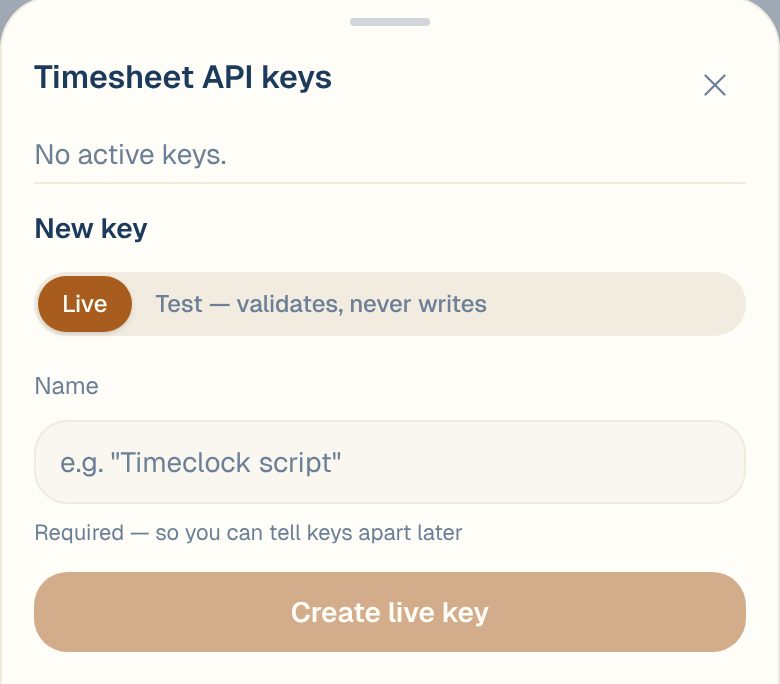
Under Timesheet API, tap Manage keys.
-
Choose Live, or Test — validates, never writes while the integration is being built.
-
Enter a Name so you can tell keys apart later, like Timeclock script.
-
Tap Create live key or Create test key.
-
Tap Copy key and send it to the person setting up the integration, then tap I’ve saved it.
The key is shown only once. Copy it before you close the sheet. If it’s lost, revoke it and create another.
Test and Live keys
| Key | What it does |
|---|---|
| Live | Saves the timesheets it sends. |
| Test | Checks everything it sends and reports back, but never saves anything. Use it to get the integration working, then switch to a live key. |
For the technical details your developer or vendor needs, email support@maitaki.ai.
Manage your keys
The API keys card lists your keys with their name, whether they’re live or test, when each was created, and when it last sent timesheets. In Manage keys you can:
- Rename a key.
- Revoke a key. Anything still using it stops working straight away. This can’t be undone, so create a new key if you need one.
Common questions
Can I see a key again after I close the sheet?
No. For safety it’s only shown once. Revoke the old one and create a new key.
How do I know timesheets are arriving?
Each key shows when it last sent timesheets, like last push 5 min ago. The hours also appear on the Timesheet tab under Labor.
We don't have anyone who can set up an API.
You can upload a CSV export instead. See Import a timesheet.