See who's on the clock
Who's working right now and who's clocked out today, in a list or on a timeline, right on your Dashboard.
Also known as: clocked in · who's working · on shift · punched in · attendance · who is in · staff in now · live labor · still working
The On the clock row on your Dashboard shows who’s working right now. Open it to see everyone who’s clocked in today, when they started, and how long they’ve been on.
Open it
- Tap Dashboard.
- Tap On the clock, under the Labor card. It opens in place.
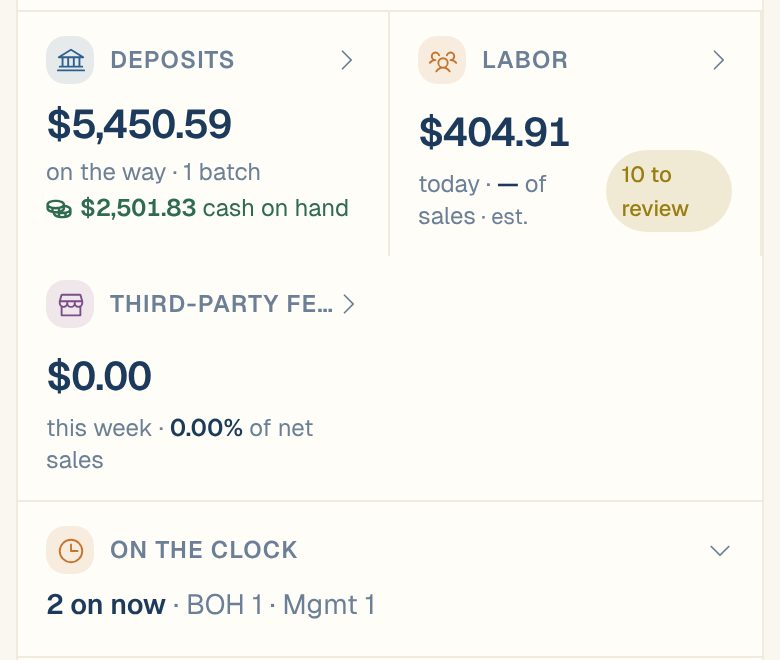
Before you open it, the row tells you how many people are on now. If you’ve set up departments, it counts them by department too. Otherwise it names the first few people.
List and Timeline
Once it’s open, you’ll see the time at the restaurant and two views. Swipe sideways, or tap the dots under them, to switch.
| View | What it shows |
|---|---|
| List | On now and Clocked out today, each person with their role, their shift times and their hours today. Someone who clocked out and back in shows each shift, with the break between. |
| Timeline | One bar per shift across the day, with a line for now. Bars still running end at the line. |
With departments set up, both views group people by department.
At the bottom, Updated says when Maitaki last heard from your time clock, in restaurant time. If you’re connected to Toast, tap Refresh to check again.
Labor while people are still working
While anyone is on the clock, today’s labor cost counts the time they’ve worked so far, as an estimate. You’ll see est. on the Dashboard’s Labor card, and on the Timesheet a chip such as Estimate · 2 on the clock with the time it was worked out.
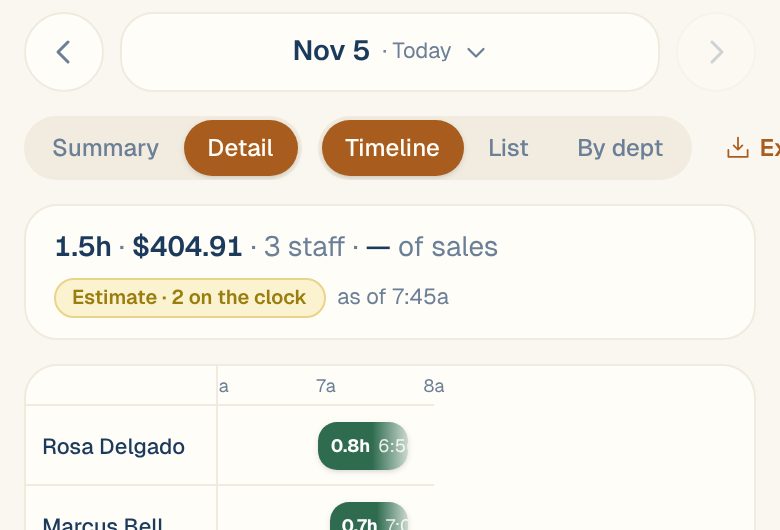
The figure becomes final once everyone has clocked out and the shifts come in from your time clock.
Common questions
Someone left hours ago but still shows as on now.
They probably forgot to clock out. Clock them out in your time clock, with the time they really left. See Fix a missed clock-in or clock-out.
I import timesheets as a file. Does On the clock work?
It shows what your last import said. A file is a snapshot, so it can’t tell who’s working right now. For live updates, connect Toast.
I don't see On the clock on my Dashboard.
It shows once your location has a labor source, and only to Managers, Admins and Owners. See Open the Labor screens.