Re-open or delete an invoice
Undo a verify, or remove an invoice that shouldn't be there.
Also known as: unverify · reopen · delete invoice · archive · undo verify · wrong upload · remove invoice · take back · mistake · not my invoice
Verified an invoice too soon, or found one that doesn’t belong? Re-opening puts a verified invoice back in review so you can fix it. Deleting takes an invoice out of your lists and your numbers altogether.
| You want to | Do this | Who can |
|---|---|---|
| Fix something on a verified invoice | Re-open it | Members and above |
| Remove an invoice that shouldn’t be there | Delete it | Managers, Admins and Owners |
Re-open a verified invoice
- Open the invoice from Purchases → Invoices. Tap Verified at the top of the list to find it quickly.
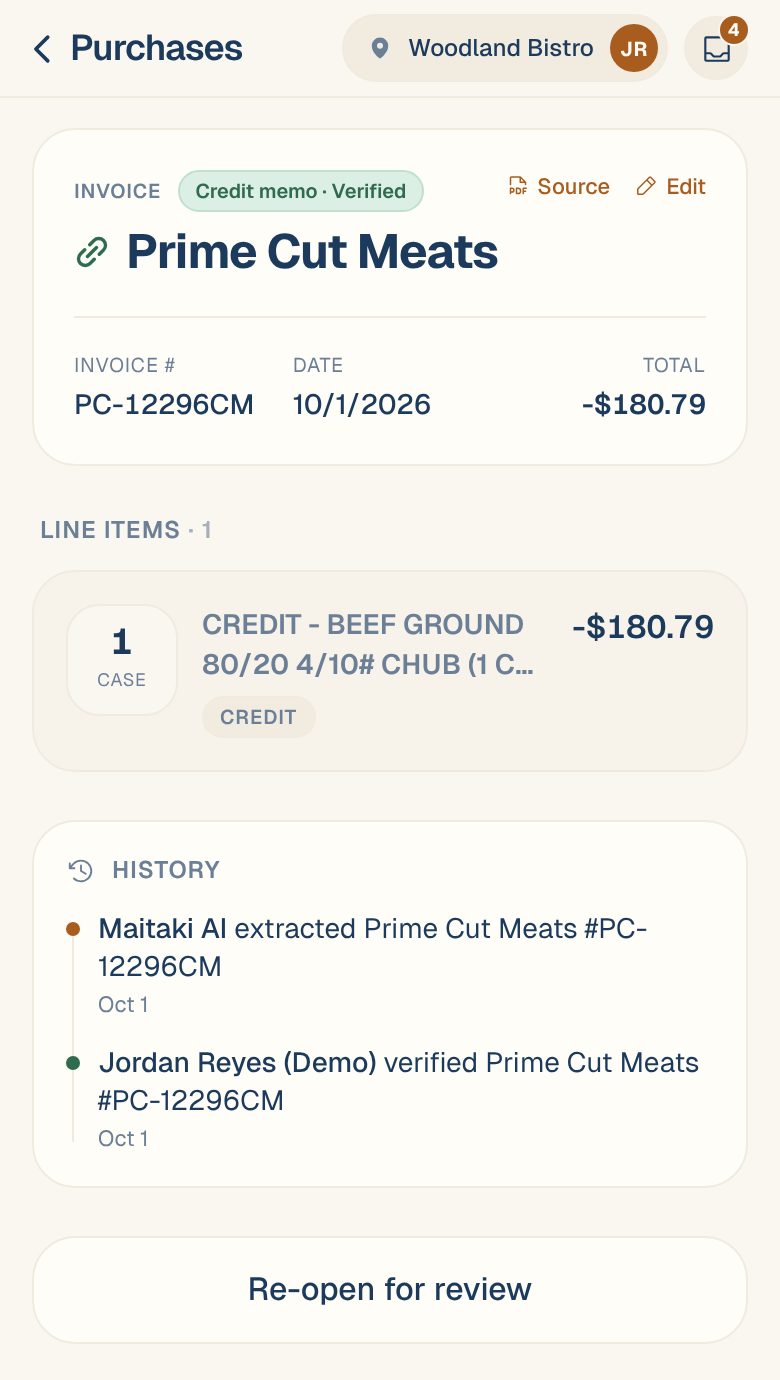
- Scroll to the bottom and tap Re-open for review.
The invoice goes back to To review. Fix what you need, then verify it again. See Review and verify an invoice.
From the Inbox, open a verified invoice and tap Unverify — I want to check it. You’ll see Back in review.
Maitaki won’t verify a re-opened invoice on its own again, even with auto-verify on. A person verifies it next time.
Delete an invoice
Delete an invoice that was uploaded by mistake, belongs to another business, or is a second copy of a bill you already have.
- Open the invoice.
- Tap Edit at the top right.
- At the bottom of the Edit invoice sheet, tap Delete invoice.
- Read Delete this invoice? and tap Delete invoice to confirm.
The invoice and its lines leave your invoice list, and stop counting toward your spend and your ingredient prices.
Check before you delete. There’s no undo in the app. If the invoice is right but one detail is wrong, fix it instead. See Change an invoice’s vendor, number, date or total.
Common questions
It's a copy of an invoice I already have.
If Maitaki flagged it as Possible duplicate, tap View to compare the two. If they’re the same bill, delete this one. See Duplicate invoices.
I don't see Delete invoice.
Only Managers, Admins and Owners can delete invoices. Ask one of them, or ask an Owner or Admin to change your role. See Roles: who can do what.