How salaries and day rates are costed
A salary is spread across the days of each pay period, so every period adds up to what payroll pays. A day rate counts on each day someone works.
Also known as: salary · exempt · fixed pay · per day · flat rate · estimated salary · salaried staff · daily rate · annual salary · salary per day
Hourly pay is easy to cost: hours times the rate. A salary doesn’t depend on hours, so Maitaki shares it out across the days of each pay period instead. That way a salaried manager shows up in every day’s labor cost, and each pay period adds up to exactly what payroll pays them.
How a salary is costed
Maitaki starts from your location’s payroll period:
- It works out what one pay period costs. A salary stated another way is converted first: $70,000 a year on semi-monthly payroll is $2,916.67 a period.
- It divides that by the number of days in the period. A 15-day period gives $194.44 a day.
- That amount is added to labor cost on each day of the period.
You can see this on the person’s pay page, under their pay:
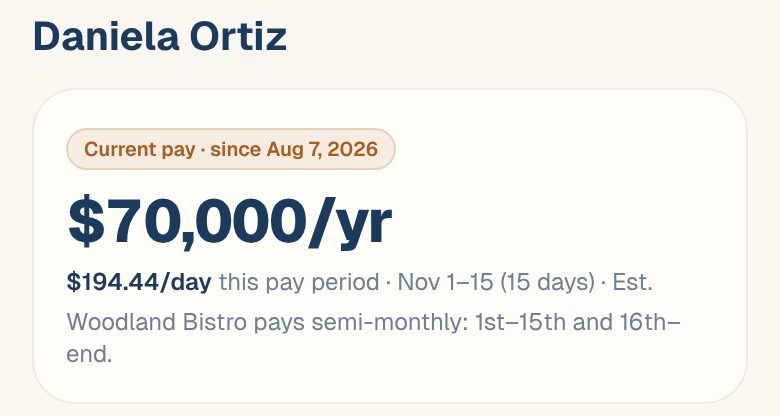
Because periods have different lengths, the daily amount changes a little from one period to the next. The period total stays the same.
Salary costs are marked Est. because they’re shared out across the period, not counted from hours someone clocked.
No payroll period set? The salary is spread over its own period instead, so a yearly salary is spread over the calendar year. Setting your real payroll period makes each period match what you pay. See Set your payroll period.
How a day rate is costed
A day rate is a fixed amount for each day someone works. Maitaki adds the full amount on every day they clock in, and nothing on days they don’t.
See what a salary costs this period
The This pay period card on a salaried person’s pay page shows the period’s salary, any bonus, and the total:
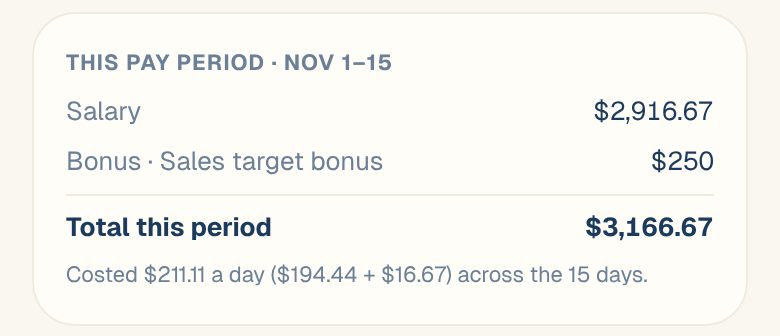
When you add or change a salary, the sheet shows What this means here: what each period costs and the daily amount for the next few periods, before you save.
Common questions
How do I put someone on a salary?
Open them from the Roster, tap Add a pay change, and choose Salary. See Set or change someone’s pay. If they aren’t on the roster, see Add someone who isn’t in your timesheets.
My salaried manager also clocks in. Are they counted twice?
No. Their clocked hours still show on the timesheet, but their cost comes from the salary.
Does the overtime setting change salaries?
No. Pay overtime premium only changes how hourly overtime is costed. See Turn the overtime premium on or off.