Compare prices across vendors
Where you'd save by switching, and how the saving is worked out.
Also known as: cheapest vendor · cheaper vendor · cheaper · price comparison · switch vendor · save money · best price · side by side · compare suppliers · shop around
When two vendors sell you the same thing, Compare shows where it’s cheapest right now and what switching would save you each week, based on how much you actually buy.
Open Compare
Tap Purchases at the bottom of the screen, then the Compare tab.
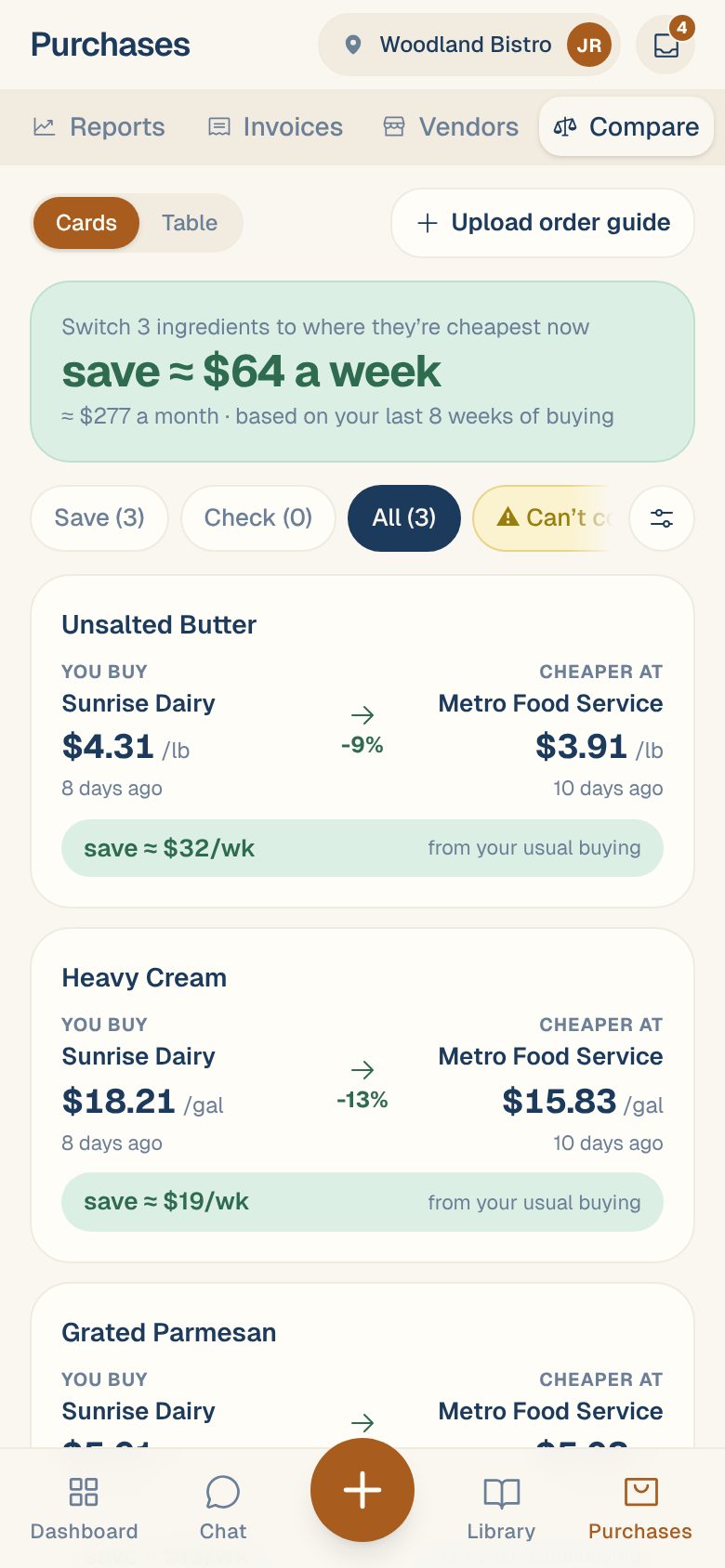
The card at the top sums it up, for example: Switch 3 ingredients to where they’re cheapest now · save ≈ $64 a week · ≈ $277 a month · based on your last 8 weeks of buying. If nothing is cheaper, it says You’re buying at the cheapest recent price.
Read the cards and the table
Switch between Cards and Table at the top left.
- Cards: each ingredient shows You buy (your vendor and price) next to Cheaper at, the percentage difference, and save ≈ $32/wk from your usual buying. Best price ✓ means you already buy at the lowest price.
- Table: one row per ingredient, one column per vendor. Your vendor’s cell is marked you buy. Other cells show how much more or less they are, and how old the price is, like 10d for an invoice 10 days old or guide 39d for an order guide.
Prices more than 30 days old show in orange. They’re shown, but never counted in the saving.
Tap any ingredient to see every vendor’s latest price for it, how much you buy a week, and Price history.
Filter the list
The chips under the headline:
| Chip | Shows |
|---|---|
| Save | Ingredients where switching saves money, using prices from the last 30 days |
| Check | Ingredients that might be cheaper elsewhere, but the cheaper price is over 30 days old. Worth asking for a fresh quote. |
| All | Every ingredient you can buy from two or more vendors |
| ⚠ Can’t compare | Prices held out because something about them looks wrong. Each has a fix. |
Tap the sliders button to open Sort and vendors:
- Savings based on your buying over: 4 weeks, 8 weeks (the default) or 12 weeks.
- Sort by: Most to save, Biggest % difference, Most spent or Name A–Z.
- Vendors: turn a vendor off to take it out of the table, the cards and the saving.
Then tap Show, for example Show 3 ingredients. Reset puts everything back.
How the saving is worked out
- For each vendor, Compare takes their latest price per unit for the ingredient, from an invoice or an order guide, whichever is newer.
- It works out how much of the ingredient you buy a week, from your last 8 weeks of invoices (or the weeks you chose).
- The weekly saving is that amount times the difference between your price and the cheapest price.
A saving only counts when both your price and the cheaper price are no more than 30 days old. The month figure is the weekly saving spread over a month.
Fix “Can’t compare”
A price that’s likely wrong would make the saving wrong, so it’s held out until it’s fixed:
| It says | Usually | Tap |
|---|---|---|
| the pack is missing, so it can’t be priced per unit | The invoice didn’t say what’s in a case | Set pack. See Fix “Can’t price” and “Needs pack” lines. |
| far from what this vendor bills — likely a case price read as one item | An order-guide price that doesn’t match their invoices | Check |
| the price check says this price looks wrong | The invoice price was flagged | Check. See Handle “Price looks off”. |
Common questions
Why isn't an ingredient I buy from two vendors listed?
Both vendors’ products need to be linked to the same ingredient, with prices in the same unit. If one is linked to a different ingredient, see Link a line to the right ingredient.
How can Compare show a vendor I've never bought this from?
From their order guide. Upload one for each vendor and Compare includes their prices for everything on it. See Upload a vendor’s order guide.
I want to stay with my vendor anyway.
Tap the ingredient, then Keep with your vendor. See Keep a vendor even when another is cheaper.