Savings & Alerts
Cheaper options and price hikes, and dismissing an alert.
Also known as: savings · price increase · price hike · cost creep · cheaper option · per year · dismiss alert · price jump · supplier went up · notifications · vendor raised prices · raised price · price went up · supplier price increase
Savings & Alerts keeps an eye on your prices for you. It shows where another vendor has been cheaper for something you buy, and flags when a vendor puts a price up.
Open it
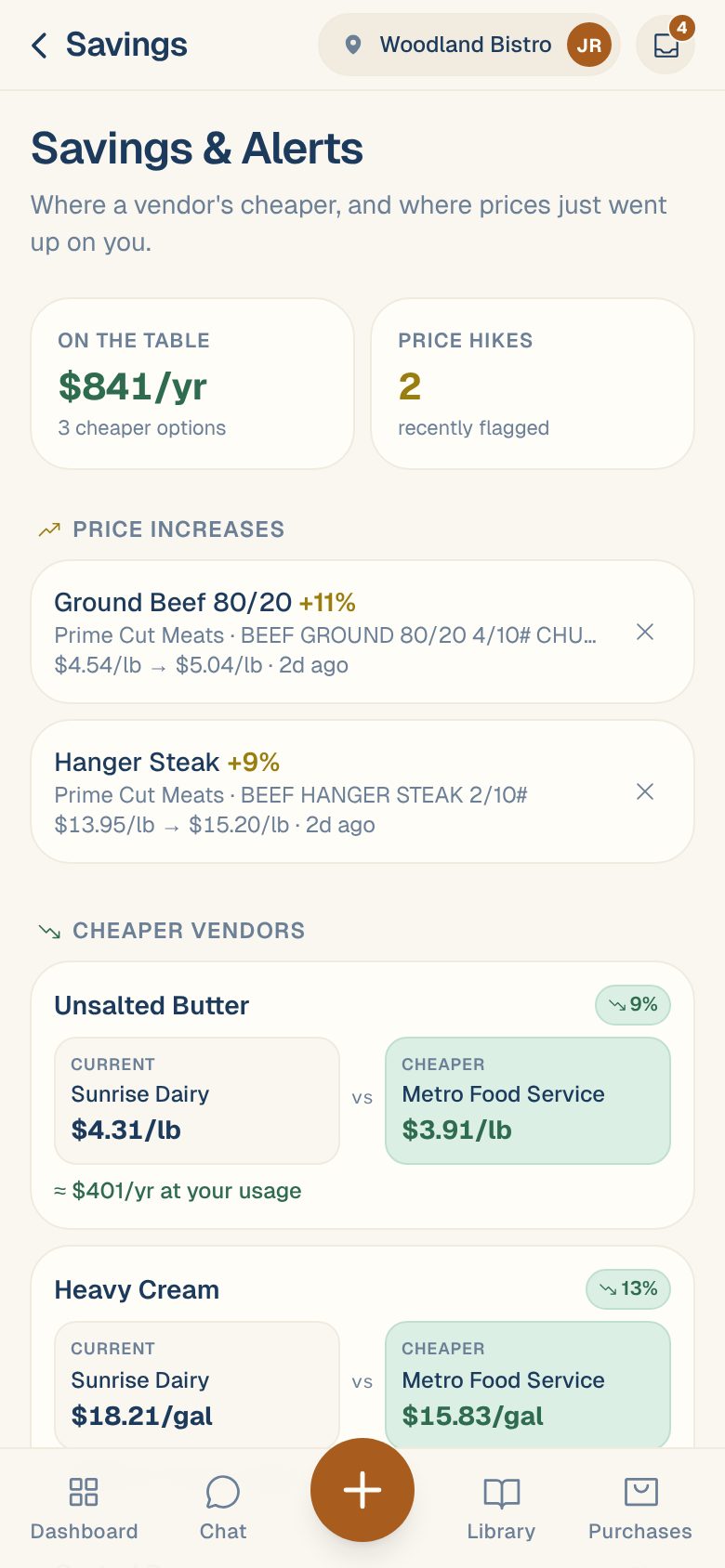
On the Dashboard, tap the Savings & Alerts card. It shows the yearly saving on the table and how many price hikes were flagged.
Until Maitaki has seen enough of your prices, the card says Cheaper-vendor tips and price-hike alerts appear here as we learn your prices.
The two numbers at the top
- On the table, for example $841/yr · 3 cheaper options: what you could save in a year by buying each item from its cheapest vendor.
- Price hikes, for example 2 · recently flagged: how many price increases are waiting for you to look at.
Price increases
Each time an invoice is verified, Maitaki compares each item’s price with the last trusted price for that ingredient. If it went up by 8% or more, you get an alert:
Ground Beef 80/20 +11% · Prime Cut Meats · BEEF GROUND 80/20 · $4.54/lb → $5.04/lb · 2d ago
- Tap the alert to open the ingredient and its price history.
- Tap ✕ to dismiss it once you’ve dealt with it.
When there are none, you’ll see No recent price jumps.
Cheaper vendors
For each ingredient you’ve bought from two or more vendors, Maitaki compares the latest price from each one. When the vendor you bought from most recently isn’t the cheapest, you’ll see:
- Current: your vendor and price.
- Cheaper: the cheapest vendor and their price, with the percentage difference.
- ≈ $401/yr at your usage: your spend on that ingredient over the last year, times how much cheaper the other vendor is.
Tap a row to open the ingredient.
Differences under 3% are left out, and so are gaps that are too big to be real. A price two and a half times another is almost always a pack size read wrong, not a deal.
When there’s nothing cheaper, you’ll see No cheaper options found — you’re buying at the best price we can see, or most items are single-vendor.
Before you switch, check like for like. A cheaper price can be a different brand or grade. Tap the row and compare what each vendor actually sends.
Common questions
An alert says a price went up, but the invoice was read wrong.
Fix the line on the invoice, then dismiss the alert. See Fix a line on an invoice.
How do I see what switching would save each week?
Compare works that out from your recent buying. See Compare prices across vendors.
Why don't I see an item I buy from only one vendor?
There’s nothing to compare it with. Cheaper vendors only shows ingredients you’ve bought from at least two vendors.