Add a recurring bonus
Add a fixed amount to someone's pay every pay period, on top of their wage or salary, so labor cost includes it.
Also known as: bonus · incentive · extra pay · stipend · allowance · regular bonus · sales bonus · lead pay · monthly bonus
A recurring bonus is an amount someone gets every pay period on top of their pay, like a kitchen lead stipend or a sales target bonus. Maitaki spreads it across the days of each period, the same way it does a salary, so your daily labor cost includes it.
A bonus is paid per pay period, so your location needs a payroll period first. If it doesn’t have one, the person’s page shows Open location settings instead of Add a bonus. See Set your payroll period.
Add a bonus
-
From the Dashboard, tap the Labor card header, then the Roster tab.
-
Tap the person.
-
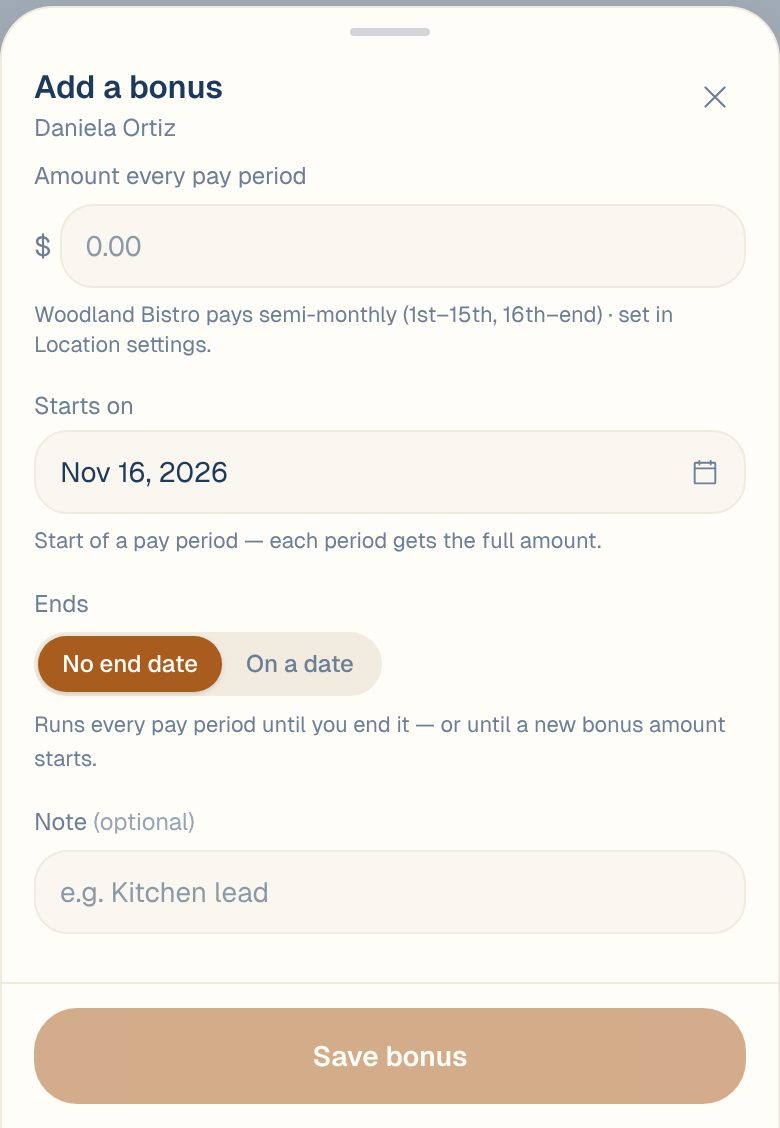
Under Recurring bonus, tap Add a bonus.
-
Enter the Amount every pay period.
-
Check Starts on. It’s set to the start of the next pay period. If you pick a day partway through a period, that period only gets the days from that date.
-
Under Ends, leave No end date, or choose On a date for a bonus that stops.
-
Add a Note if it helps, like Kitchen lead.
-
Check What this changes, then tap Save bonus.
What this changes shows how the bonus is spread over each period’s days, and how much labor cost moves on past days if you backdate it.
On the roster, the person now shows a chip like +$250 bonus / period.
Change or stop a bonus
Tap the bonus under Recurring bonus to edit it, then tap Save changes.
- To stop it from a date: choose On a date under Ends and pick the last day.
- To change the amount from a date: add a new bonus that starts on that date. The old one ends the day before.
- To remove it completely: tap Delete this bonus…, then Delete. Those dates will have no bonus.
Common questions
Does the bonus show up in reports?
Yes. It’s part of labor cost for each day of the period. On a salaried person’s pay page, the This pay period card shows the salary, the bonus and the total.
Can I give a one-off bonus?
Set Starts on to the first day of a pay period and Ends to its last day. The bonus then counts for that one period only.
Who can add bonuses?
Managers, Admins and Owners.