Log cash sales
Turn on Manual Cash Logging, then record each shift's cash so it counts in your sales.
Also known as: cash sales · cash drawer · record cash · cash only · enter cash · till takings · add cash · cash count · cash total · manual entry · cash sale not in pos
If some of your cash sales never go through your POS, or you don’t have a POS, you can record them in Maitaki. Logged cash counts in the day’s total sales, so your labor % and food cost % include it.
Only log cash your POS doesn’t record. Logged cash is added on top of your POS’s numbers. Cash already rung in your POS would count twice.
Turn on Manual Cash Logging
A Manager or above does this once for each location.
- Tap your location and avatar at the top right, then Settings.
- Tap the location, then Sales under Connections.
- Scroll to Manual and turn on Manual Cash Logging.
- Tap Save changes.
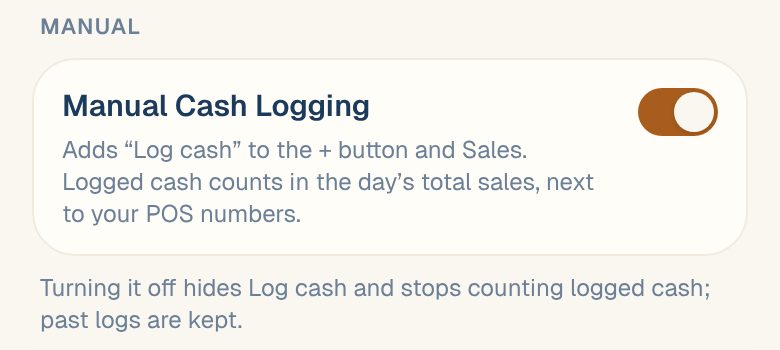
Log cash now appears in the + menu and on the Sales tab.
This switch is not the same as Track cash deposits, which tracks the cash you take to the bank. You can use either, or both. See Track cash deposits.
Log a shift’s cash
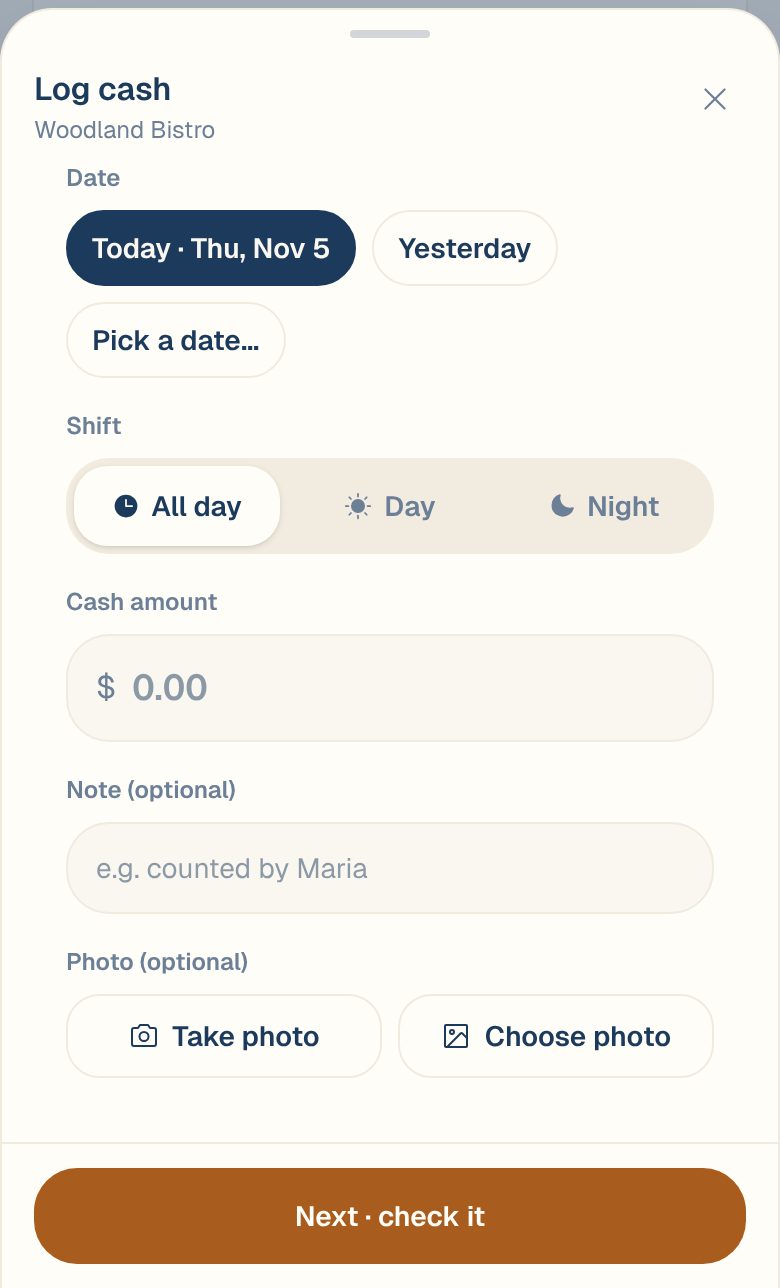
- Tap the round + button at the bottom of the screen, then Log cash. Or tap Log cash on the Sales tab.
- Under Date, tap Today, Yesterday, or Pick a date… for another day.
- Under Shift, choose All day, Day or Night.
- Type the Cash amount.
- Add a Note if you like, such as who counted it.
- To keep a photo of the count, tap Take photo or Choose photo.
- Tap Next · check it. Maitaki shows the business day and shift in large type so you can check them.
- Tap Confirm & save, or Back to edit to change something.
You can also log cash from your team’s Telegram group. See Use the Maitaki bot.
See and change a log
On the Sales tab, each day shows your POS amount and Cash, or no cash logged. Open a day to see its Manual cash row, with each log’s shift, time, who entered it and any note.
- To add another log for that day, tap Add.
- To change a log, tap it, edit it, then tap Next · check it and Confirm & save.
- To delete a log, tap it, then Delete this log. Managers and above can delete logs.
How logged cash counts
- It’s added to the day’s total sales, next to your POS numbers.
- The amount you type is treated as including sales tax. Maitaki takes the tax back out using your tax rate. See How estimated tax works.
- If cash deposit tracking is on, logged cash is also part of that day’s expected cash deposit.
If you turn Manual Cash Logging off, Log cash disappears and logged cash stops counting in your sales. Your past logs are kept.
Common questions
I don't see Log cash.
Either Manual Cash Logging is off for this location, or you have Viewer access. Check that you’re on the right location, then ask a Manager to turn it on or to change your role.
I logged cash on the wrong day.
Open the day you logged it on, tap the log, then change the Date. Tap Next · check it and Confirm & save.
Can my team see each cash log as it's saved?
Yes, in a Telegram group. See Post cash logs to Telegram.