See every change to a shift
The Edited chip on the Timesheet, and a shift's full history of times, roles and rates, newest first.
Also known as: edited · audit · changelog · timecard history · adjusted hours · who changed · punch edits · modified shift · deleted punch · audit trail
When a shift is changed in your time clock after it was first recorded, Maitaki keeps both versions. The Timesheet marks the shift Edited, and its history shows what changed, when, and who changed it, if your time clock says.
Spot an edited shift
- From the Dashboard, tap the Labor title, then the Timesheet tab.
- Pick the dates and tap Detail.
- Look under the time card for Edited. The line under it says what it was before, like was out 9:41p.
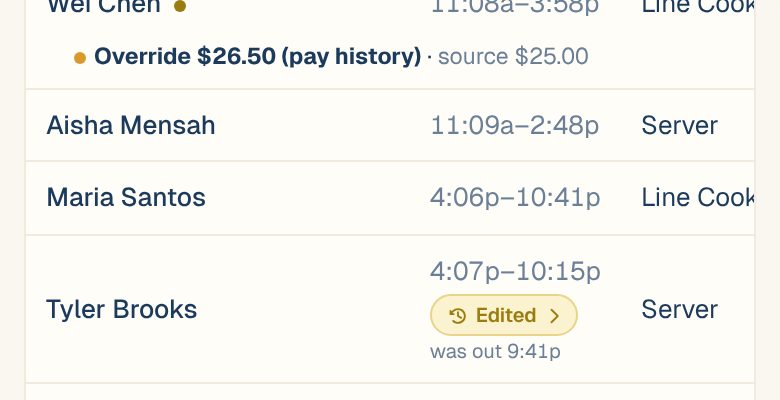
Only changes made in your time clock show Edited. Pay you set in Maitaki doesn’t.
Open a shift’s history
Tap Edited to open Shift history.
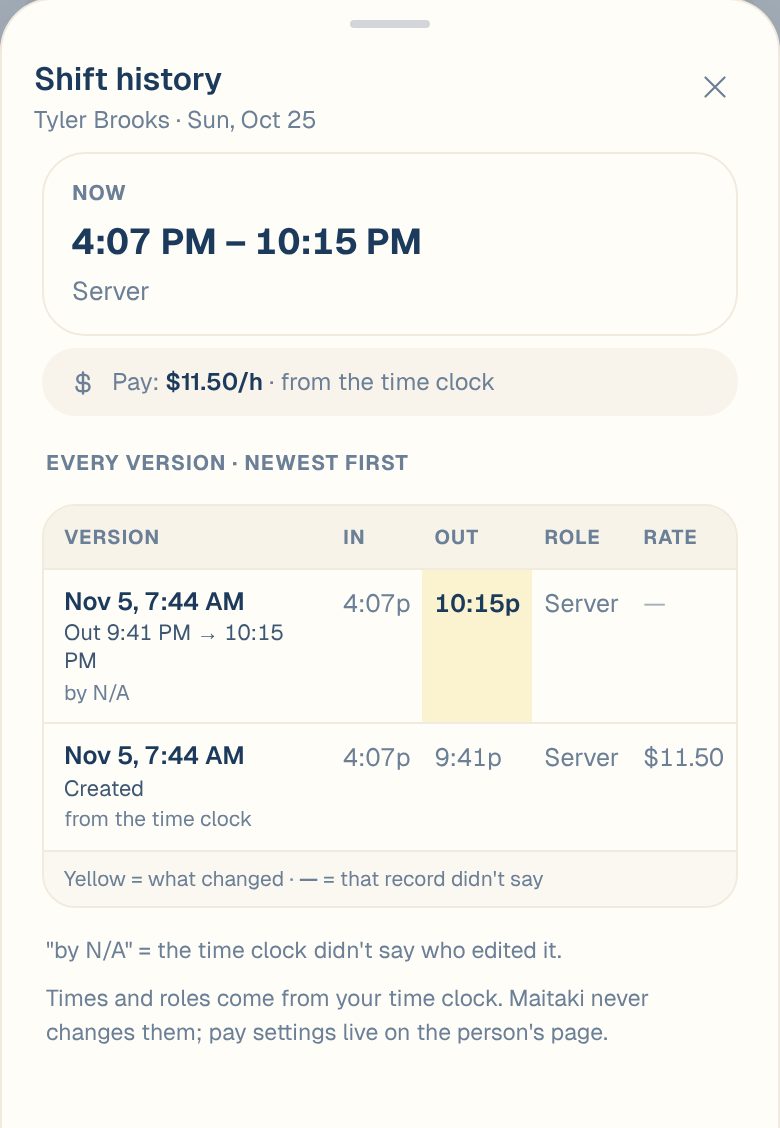
| You’ll see | What it means |
|---|---|
| Now | The shift’s times and role as they are today |
| Pay | The rate it’s costed at, and whether it comes from your time clock or was set in Maitaki |
| Every version · newest first | One row per change, with In, Out, Role and Rate at that point |
| Yellow cell | What changed in that version |
| — | That record didn’t say |
| by N/A | Your time clock didn’t say who made the change |
The first row at the bottom is usually Created, the shift as it first came in.
Punches deleted before they counted
If a shift was deleted in your time clock, it shows on the Timesheet struck through, marked never counted. It isn’t in any labor or pay total. Tap it to see its history.
Rate changes
If your time clock changed the rate on a shift it had already sent, the Timesheet says so under the shift, like Rate changed by Toast: $15.00 → $16.00. Tap History beside it to open the same Shift history. This shows when the Rate column is on. See Use the Timesheet.
Everything for one person
- On the Roster tab, tap the person.
- Scroll to History.
- Choose All, Time clock or Pay override to filter. Tap a time-clock change to open that shift’s history.
Pay override lists pay changes made in Maitaki. See Set or change someone’s pay.
Common questions
Can I undo an edit from here?
No. Maitaki never changes your time clock’s times. To change a shift again, edit it in your time clock. The new version shows here when it comes in.
Why are there no changes before a certain date?
Maitaki keeps history from when it started recording changes. Earlier edits weren’t kept, so a shift may say No changes since Maitaki started keeping history.
Who changed it?
The name your time clock sends, like by Jordan R. If it shows by N/A, your time clock didn’t say. Ask whoever manages it.