Track delivery-app payouts
See what DoorDash or Slice should pay you each week, what they actually paid, and which payouts are late.
Also known as: doordash payout · weekly payout · payout late · statement · payout id · slice payout · delivery money · app deposit · ubereats payout · grubhub payout · missing payout
Ordering apps pay you on their own schedule, separately from your card deposits. When DoorDash or Slice is connected for fees and payouts, Maitaki shows each week’s payout: what it should be, what was paid, and whether the two match.
Connect an app
Payouts come from the app’s own files, which take a few steps on our side to set up. See DoorDash and Slice fees and payouts, or email support@maitaki.ai with your location’s name.
See your payouts
- Open Sales from your Dashboard, then tap the Deposits tab.
- Tap the 3rd Party tab.
The tab’s total shows the next payout and its day, or nothing due.
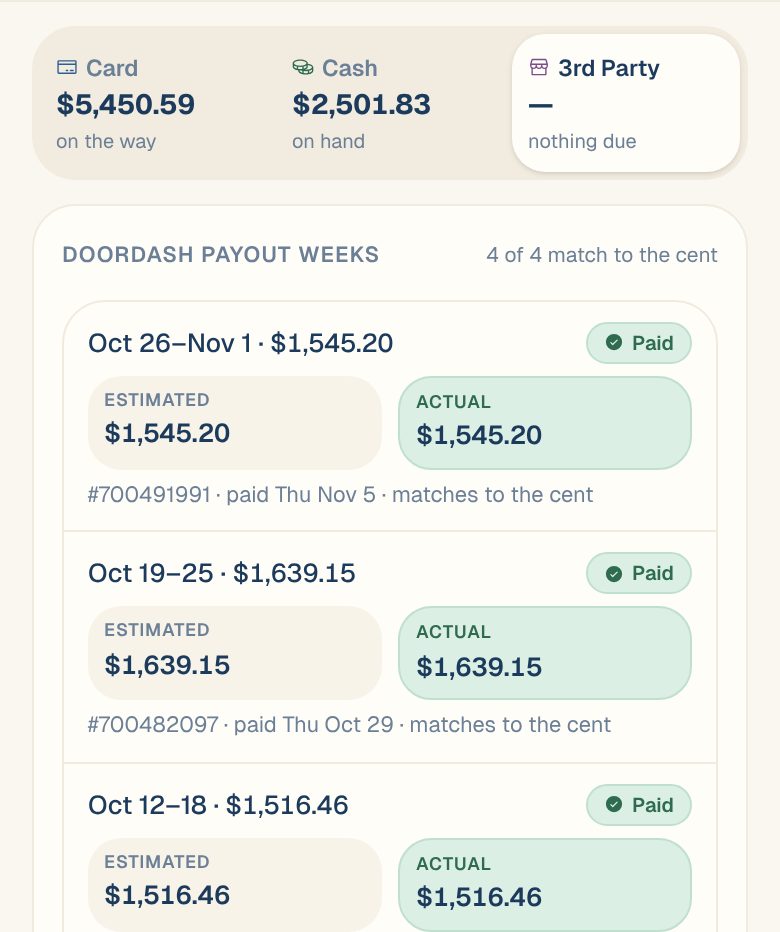
DoorDash payout weeks
Each DoorDash week shows two amounts side by side:
- Estimated: what DoorDash’s own order rows for the week add up to, after its fees.
- Actual: what DoorDash paid, from its payout summary.
Under them is the payout number, the day it was paid, and matches to the cent or off by an amount. The heading says how many weeks match.
| Status | What it means |
|---|---|
| This week | The week is still going. The amount is so far. |
| Pending | The week has closed and the payout is due. |
| Late | The payout’s due day has passed and it hasn’t been paid. |
| Part paid | Some of the week has been paid, and some is still pending. |
| Paid | Paid. The line under it says whether it matches. |
| Paid · off | Paid, but not the same as the estimate. Open the week to see why. |
The newest weeks show first. When there are more than eight, tap Show all at the bottom to see the older ones.
Open a week
Tap a week to see:
- Estimated and Actual, and what explains any difference, such as part of the week paid in another payout.
- Payout: the payout number, the day it was paid or is due, and its status. Lands says when DoorDash paid. The day it reaches your bank isn’t known yet.
- Days: each day’s orders, gross sales, fees and post-fees amount.
- Fees by kind, Error charges if there were any, and the payout By channel.
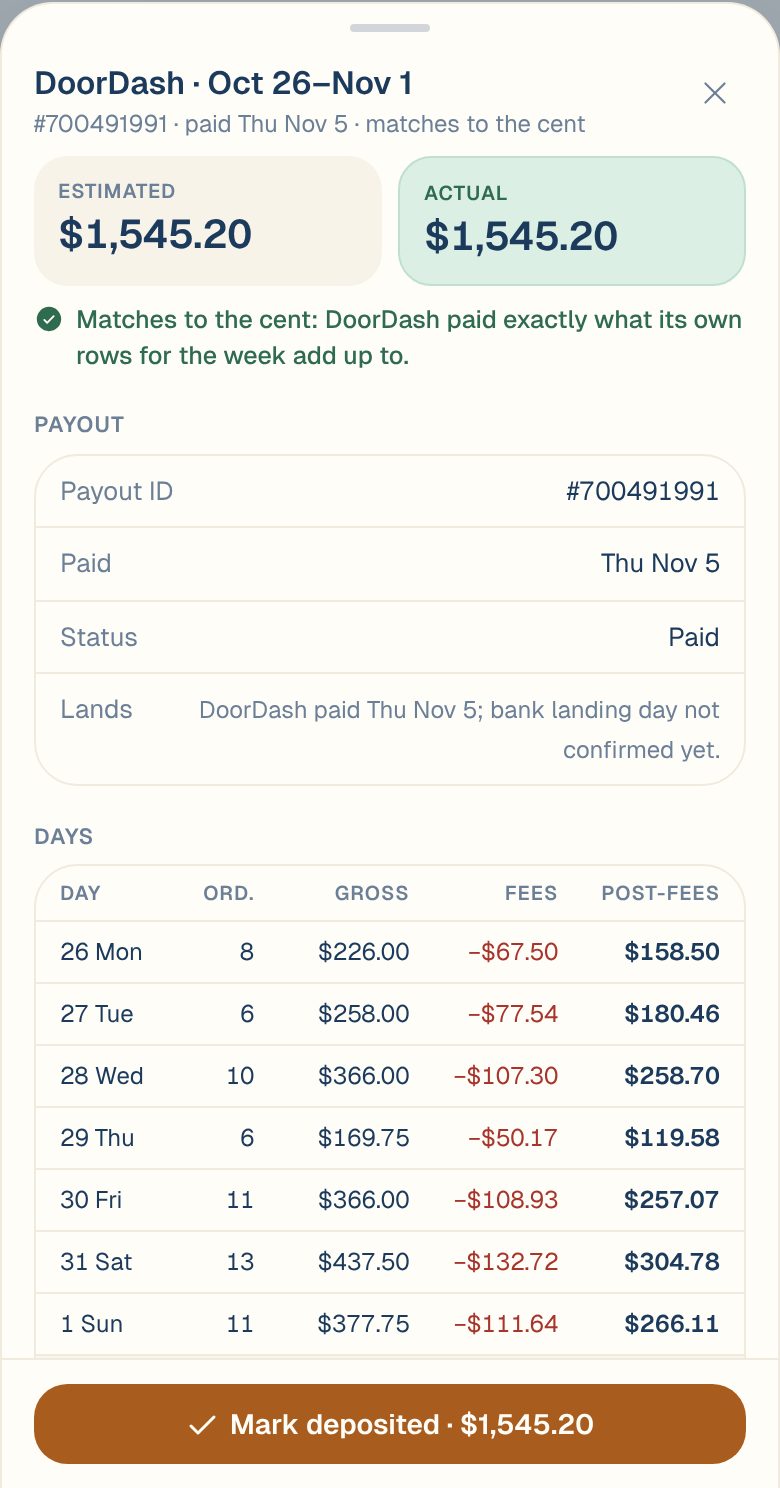
When the money is in your bank, Members and up can tap Mark deposited at the bottom. Tap Marked deposited · undo to take it back.
Slice payout weeks
Slice weeks show one amount, marked ≈ until Slice’s statement arrives:
| You’ll see | What it means |
|---|---|
| Estimated so far | The week is still going. |
| Estimated | The week has closed. Waiting for Slice’s statement. |
| Estimated · statement late | Slice’s statement is past its due day. |
| Statement | Slice’s statement is in and matches. |
| Statement · differs | Slice’s statement is in, but it’s over or under the estimate. |
Apps that aren’t connected
Apps your POS recorded this week, but whose payouts aren’t tracked, are listed under Seen in your POS this week · payout not tracked yet. Their sales already count. See DoorDash and other apps in your sales.
Common questions
Why isn't a DoorDash payout in my card deposit?
DoorDash pays you directly, on its own schedule. App payouts are never part of a card deposit.
A payout says Late. What do I do?
Check your bank first. If the money isn’t there, look up the payout in your DoorDash merchant portal, or contact DoorDash.
Why are the days different from the week's estimate?
The days follow your business day. DoorDash’s week follows its own clock, so an order late at night can fall in a different week.