Link your Telegram
So the Maitaki bot knows it's you.
Also known as: personal telegram · connect my account · bot · link me · telegram account · connect telegram · unlink telegram · wrong telegram · tg
Linking your Telegram tells the Maitaki bot who you are. Once linked, you can log cash in your team group and ask the bot questions in a private chat, answered with your own role. You link once, and it works in every Maitaki group you’re in.
Link from your profile
- Open the account menu (your location and avatar, top right on a phone; bottom left on a computer) and tap your name.
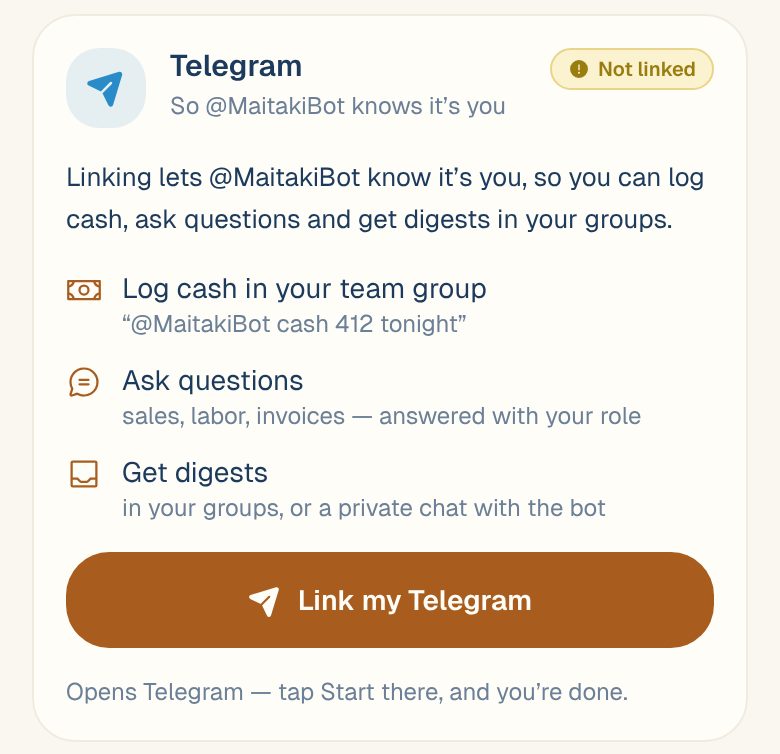
- On Your profile, find the Telegram card. If you’re not linked yet, the banner One step left: link Telegram so the bot knows you. takes you straight there.
- Tap Link my Telegram. Telegram opens a chat with @MaitakiBot.
- Tap Start in Telegram.
The bot replies that you’re linked. Back in Maitaki, the card says Waiting for Telegram… and turns Linked by itself.
Link from your team group
If your restaurant’s Telegram group already has the Maitaki bot in it:
- In the group, send @MaitakiBot link me.
- The bot replies with a Link me button that only you can use. Tap it to open a private chat with the bot.
- Tap Confirm in Maitaki. Sign in if you’re asked.
- Maitaki asks Is this your Telegram? and shows your Telegram and Maitaki accounts side by side. Tap Yes, link it to me.
The confirm link works for 15 minutes. If it runs out, send @MaitakiBot link me again.
The bot can offer this for you. If you try to log cash in the group before you’re linked, the bot replies with a Link me button, and runs your message as soon as you’ve linked.
An Owner or Admin can also link someone’s Telegram for them. See Get your team linked to Telegram.
What linking lets you do
Your profile shows your Telegram name and works in every group you’re in. Then:
- In your team group, you can log cash with @MaitakiBot cash 412 tonight. Cash logging needs a Member role or above.
- In a private chat with the bot, ask anything and get answers with your own role. A Manager sees sales and labor; a Member gets operational answers.
- Questions in a group are answered at what that group is allowed to see, whoever asks. See Add Maitaki to your team’s Telegram group.
See Use the Maitaki bot for what to send.
Disconnect your Telegram
- Open Your profile and find the Telegram card.
- Tap Disconnect.
- Tap Disconnect again to confirm, or Keep it to back out.
The bot stops knowing it’s you. Cash logs and questions from that Telegram stop working until you link again.
Common questions
It says this Telegram is already linked to someone else.
One Telegram account belongs to one person in Maitaki. The other person needs to disconnect it from their profile first, or ask an Owner or Admin to help.
The card says "An admin linked this for you". It isn't my Telegram.
Tap Disconnect on the card, then link your own Telegram.
It says my account can't open any restaurant yet.
You need access to at least one location before you can link. Ask an Owner or Admin to give you access. See Change someone’s role or locations.
I got a new phone or Telegram account.
A new phone with the same Telegram account needs nothing: the link is to your Telegram account, not the phone. For a different Telegram account, tap Disconnect on the Telegram card in your profile, then Link my Telegram again.