What each Inbox status means
Every pill in the Inbox, and what to do about it.
Also known as: badge · pill · label · colored tag · what does it mean · legend · key · icons · dot · chip meaning
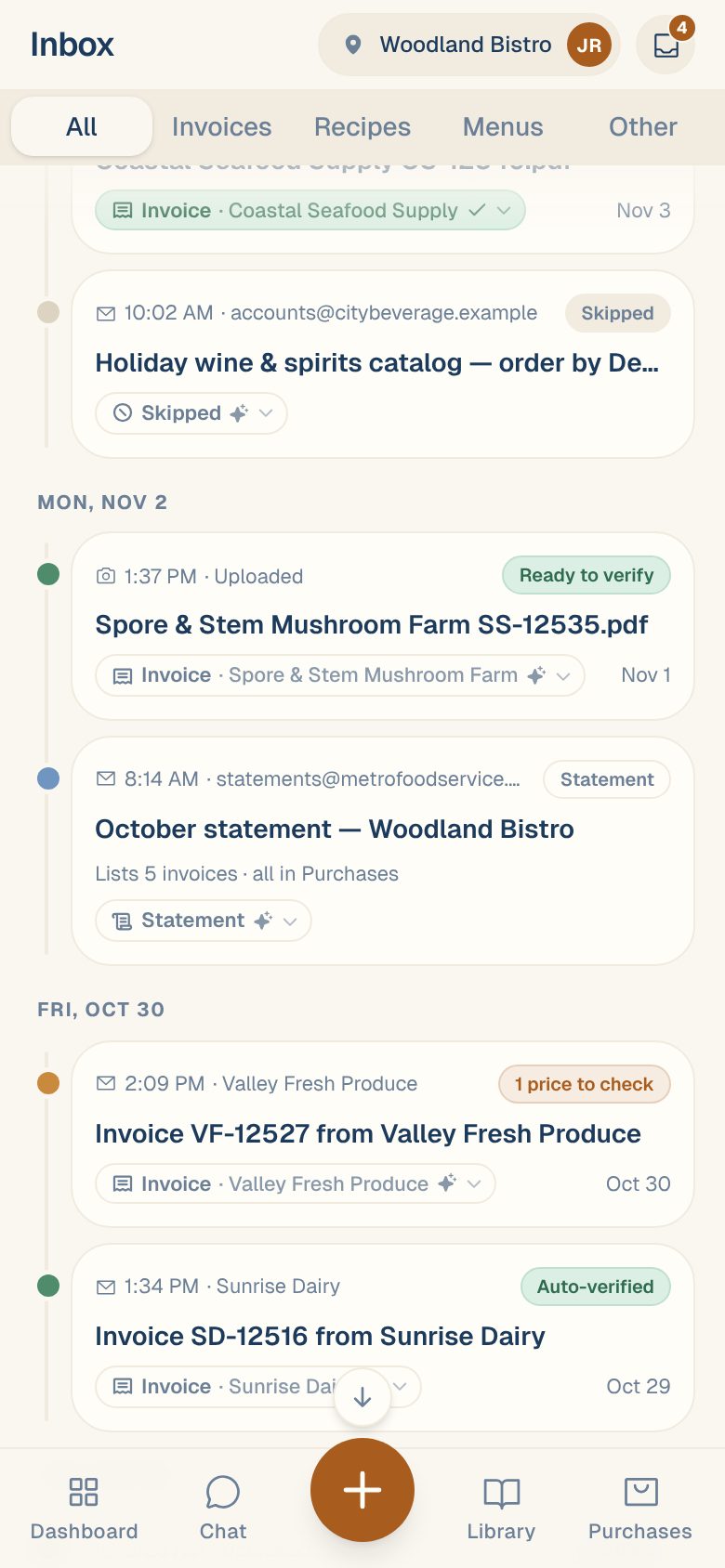
Every card in the Inbox has a status on its right-hand side. It tells you, in a word or two, what happened to the document and whether anything is left for you to do.
Still in progress
| You’ll see | What it means | What to do |
|---|---|---|
| Uploading… or Waiting… | Your phone is still sending the file. | Keep the app open until it’s gone. |
| A red card, like Upload failed | The file didn’t reach Maitaki. | Tap Retry, or ✕ to drop it. |
| Reading… | Maitaki is reading it. | Nothing. You can leave the screen. |
| Stuck | No progress for 3 minutes. | Open it and tap Try again. See Fix an upload that failed or got stuck. |
Needs you
| You’ll see | What it means | What to do |
|---|---|---|
| Ready to verify | Every check on the invoice passed. | Open it and tap ✓ Mark verified. |
| 1 price to check, Total doesn’t match and similar | The first thing on the invoice that needs a look. | Open it and fix it. See What “Needs review” means. |
| 3 new items | Every check passed, and some lines will become new ingredients when you verify. | Open it and verify. |
| To review | An invoice waiting for a person. | Open it. |
| What is it? | Maitaki wasn’t sure what kind of document this is. | Choose. See Tell Maitaki what a document is. |
| Check this (red) | Maitaki flagged it for a closer look, for example a skip rule caught something that reads like an invoice. The reason shows under the title. | Open it and choose what it is. |
| Might be a copy | It looks like an invoice you already have. It doesn’t count until you decide. | Choose Same invoice or Different bill. See Duplicate invoices. |
| Couldn’t read | Reading failed. | Open it and choose Try reading it again or Not a document. |
Done
| You’ll see | What it means |
|---|---|
| Verified | Someone verified the invoice. |
| Auto-verified | Maitaki verified it on its own. See Let Maitaki verify invoices for you. |
| Already on file or Already have it | A copy of an invoice you already have, set aside so it isn’t counted twice. |
| Statement | A statement or reminder. Kept, never counted. See Statements and past-due reminders. |
| Skipped · order | An order confirmation. Kept to spot a missing invoice, never counted. See Why order confirmations don’t count. |
| Filed | An order guide, menu, recipe or permit, saved where it belongs. |
| Skipped or Dismissed | Set aside as not needed. See Restore something you skipped. |
A file holding many invoices
A PDF with many invoices in it shows as one card, named with the file and how many invoices it held, like October.pdf · 12 invoices. A colored bar shows how they’re split between done, to review, copies and unread. Its status is one of:
| You’ll see | What it means |
|---|---|
| Reading… | Still working through the file. You’ll see Scanning pages or Reading invoices and a count. |
| Stuck | It stopped partway. Open it and tap Resume reading this file. |
| Couldn’t split | It couldn’t be split into invoices. Open it and tap Resume reading this file. |
| 5 to review | Invoices from the file waiting for you. |
| 2 might be copies | Possible copies to decide on. |
| 1 couldn’t read | Pages that weren’t read. |
| All sorted | Nothing left to do. |
See Work through a file of many invoices.
The chip under each card
The chip under the title says what the document was sorted as, and its look says who decided:
| Look | Means |
|---|---|
| Sparkle | Sorted by Maitaki, and nobody has checked it yet |
| Tick | Confirmed by a person, or verified by hand |
| List icon | Sorted by Your rule |
| Question mark, like Invoice? | Maitaki isn’t sure, and it’s waiting for you |
| Person icon | Changed by you |
Common questions
Why does the badge on the tray icon say 4 when I only see 3 invoices?
The badge counts everything that needs you, not only invoices. A document waiting at What is it? or a Might be a copy counts too. The summary card says + 1 other item when that’s the case.
Does an invoice count in my spend before it's verified?
Yes. It counts in your Purchases total from the moment it’s read. Copies held as Might be a copy, order confirmations and statements never count.