Track card deposits
See what's landing in the bank this week, what's still on the way, and mark each deposit once you see it.
Also known as: bank deposit · settlement · batch · payout · deposit missing · funds · money in bank · batches · settled · bank statement · reconcile bank
The Deposits tab shows the money on its way to your bank: card sales from your POS or card terminal, cash waiting to be taken in, and payouts from ordering apps. Each deposit shows the day it should land, so you can check it against your bank account.
Open Deposits
- Open Sales from your Dashboard (see Find your sales).
- Tap the Deposits tab at the top.
You can also tap the Deposits card on your Dashboard.
Landing this week
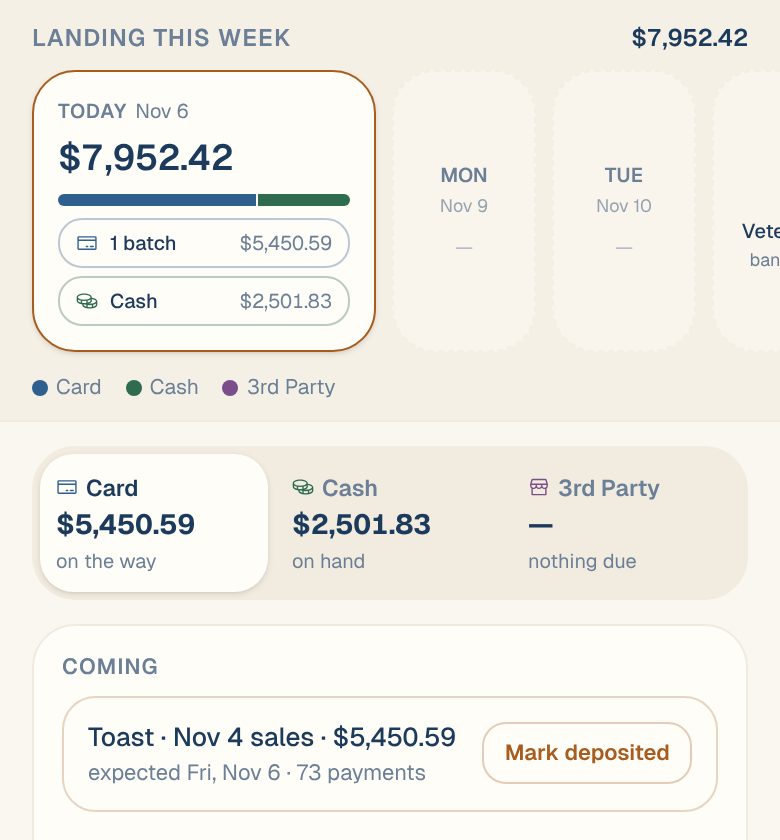
The band at the top shows the next seven days, with the total for the week on the right. Each day with money landing gets a card with its total and a line for each kind of money:
| You’ll see | What it means |
|---|---|
| 1 batch, 2 batches | Card deposits landing that day. |
| Cash | Cash still to take to the bank. It sits on the next bank day. Only shows when cash deposit tracking is on. |
| An app’s name, like DoorDash | A payout from an ordering app. |
| ≈ before an amount | An estimate. The exact amount settles at your bank. |
| A holiday name and banks closed | No deposits land that day. |
Weekends without deposits are left out. Swipe the band sideways to see the rest of the week.
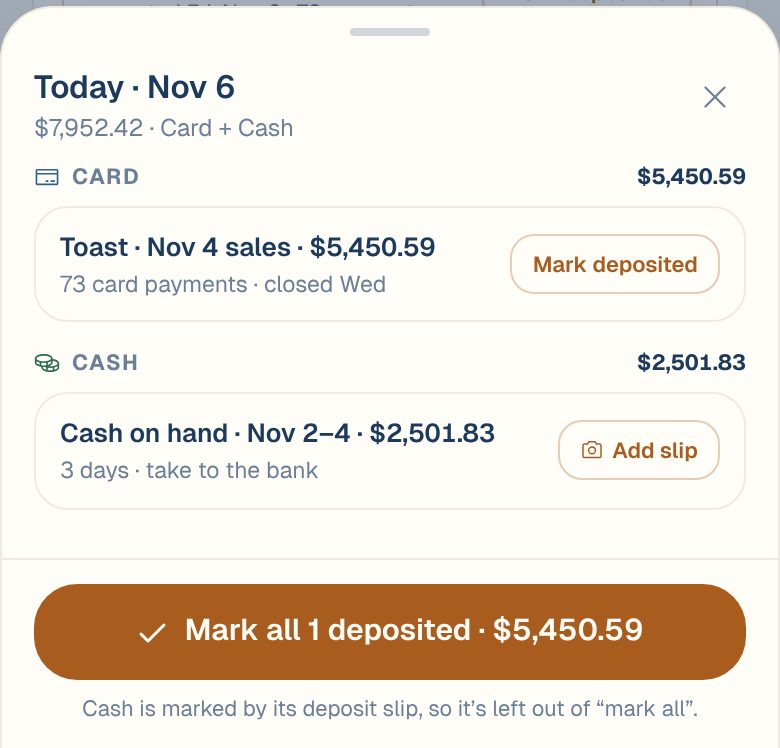
Tap a day to see each deposit in it. From there you can mark them one by one, or all at once with the Mark all button at the bottom. Cash isn’t included in that button. It’s marked by its deposit slip instead. See Add a deposit slip.
The Card tab
Under the band, three tabs filter the list below: Card, Cash and 3rd Party. Each shows a running total: card money on the way, cash on hand, and the next app payout.
On Card:
- Coming lists deposits that haven’t landed yet, oldest first, each with its expected day and number of payments.
- Arrived lists past deposits by the day they reached the bank, grouped by month with a total for each. A day shows expected until you mark it, then deposited. Tap a day to see the deposits in it.
- Open now appears when you have a card terminal. It shows each terminal’s batch that hasn’t closed yet and its total so far.
Tap any deposit to open it. You’ll see its payments, gross sales, tips and the net amount, and any fees the processor kept. See Why a deposit is less than your sales.
With Clover or Loyverse
Clover and Loyverse don’t share their deposits with Maitaki. So the Card tab shows Daily card deposits instead: each day’s card sales, with the day it should land (Lands ~). These are estimates of the gross amount. The deposit at your bank will be lower by your processing fees. Tap the circle on a day to mark it deposited.
Mark a deposit as deposited
When you see a deposit in your bank account:
- On Deposits, find it under Coming, or tap its day in Landing this week.
- Tap Mark deposited.
It moves to Arrived, filed under the day it landed. Marking a deposit only records that you’ve seen it in your bank. It doesn’t move or change any money.
Changed your mind? Tap Deposited next to it on the day’s sheet, or open the deposit and tap Mark as not deposited.
Common questions
Who can mark deposits?
Members and up. Viewers can see the Deposits tab but not mark anything. See Roles: who can do what.
When will my next deposit land?
It depends on your POS or terminal, weekends and bank holidays. See When will my card money arrive?
A deposit says expected, but it isn't in my bank.
Check the bank again on the next bank day. A deposit can land a day late around weekends and holidays. If it still hasn’t arrived, contact your card processor with the date and amount shown.
Where are DoorDash payouts?
On the 3rd Party tab. They’re never part of a card deposit. See Track delivery-app payouts.