Set a product's pack size
"1 case = 6 × 5 lb": what it means and how to fix it.
Also known as: case size · pack · case pack · unit size · count per case · case breakdown · inner pack · units per case · wrong pack · repacked
A product’s pack says what’s inside one of the things you’re billed for. 1 case = 4 × 10 lb means one case holds four 10 lb bags. Maitaki needs it to turn a price per case into a price per pound, gallon or each, so a missing or wrong pack means a missing or wrong cost.
The pack belongs to the vendor’s product, not to one invoice. Set it once and every invoice for that product uses it.
Find the pack
- Tap Library, then the ingredient.
- Under Vendors & products, tap the product. A product with no pack is marked needs pack.
- The Pack section shows what’s on file, like 1 case = 4 × 10 lb, or No pack info yet.
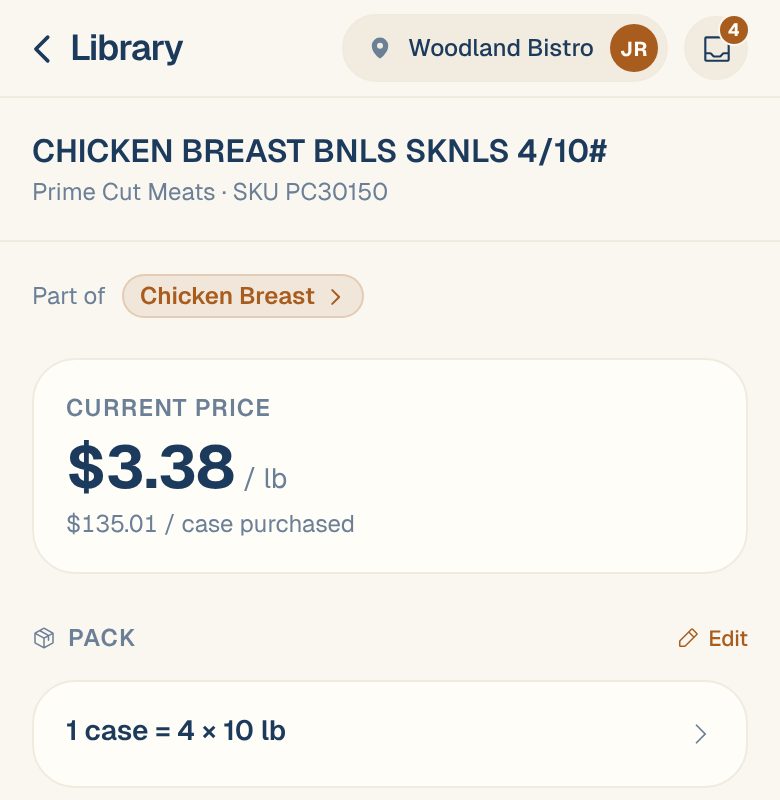
You may also see Catch weight, for a product billed by its actual weight, or Estimated size, for one sold in a range like 9–12 each.
Change it
-
Next to Pack, tap Edit. Or, on the ingredient page, tap ⋮ on the product’s row, then Edit pack info.
-
Fill in what one purchase unit holds. The questions depend on how the product is billed:
Billed by You’ll be asked A case, box, pack or crate One case holds how many units?, then Each unit contains, a size and unit A single item, like each, bottle, bag or tub 1 each contains, a size and unit Anything, when the ingredient is priced per each or dozen One case = how many each? -
Check the preview: This product’s latest price becomes $3.38/lb. If it’s far from the current price, you’ll see a warning to double-check the count.
-
Tap Save pack info.
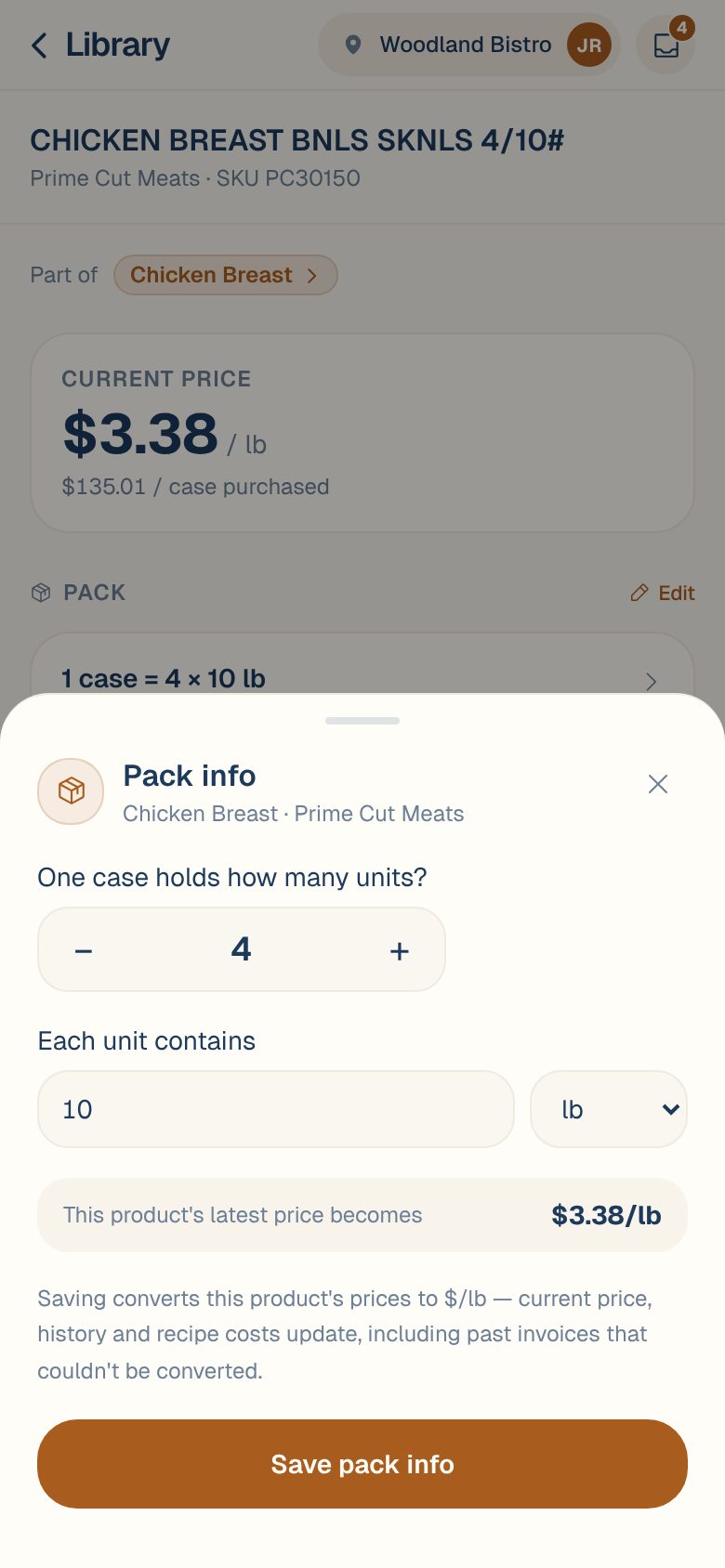
The current price, the price history and the cost of every recipe that uses the ingredient update, including past invoices that couldn’t be priced before.
Read the description. Most vendors print the pack in the item name: 4/10# is 4 × 10 lb, 6/1 GAL is 6 × 1 gal, 36/1# is 36 × 1 lb.
Fixed a mistake, or did the vendor repack it?
When you change a pack that was already on file, Maitaki asks which it is: This differs from the pack on file. Was the old one wrong, or did vendor repack it?
| Tap | When | What happens |
|---|---|---|
| Fix it · re-price past invoices | The old pack was wrong | Every invoice for this product, past and future, is re-priced with the new pack. |
| New pack going forward · keep past invoices | The vendor really changed the case | Past invoices keep the old pack. New ones use the new pack. |
Every change is listed under History in the same sheet, with who made it and when.
Common questions
The pack is right but the price still looks wrong.
Check how the invoice billed it. Some vendors print the case pack but charge per item. If the price check has flagged it, see Handle “Price looks off”.
Can I set the pack from the invoice instead?
Yes. Tap the line on the invoice and edit its pack there. See Fix “Can’t price” and “Needs pack” lines.
A vendor never prints packs. Do I have to do every product by hand?
No. Upload their order guide and Maitaki fills in the packs from it. See Upload a vendor’s order guide.
I don't see Edit next to Pack.
You have Viewer access, which can look but not change packs. Ask an Owner or Admin to change your role.