Get your team linked to Telegram
See who has linked their Telegram, and send the rest a ready-made message asking them to.
Also known as: nudge · remind staff · who's linked · telegram not linked · bot doesn't know me · chase staff · link reminder · telegram setup · team chat
The Maitaki bot only knows who someone is once they’ve linked their Telegram. Until then, it can’t log cash or answer questions for them. Members shows who’s linked and helps you nudge the rest.
See who’s linked
- Open the account menu (your location and avatar, top right on a phone; bottom left on a computer) and tap Settings.
- Tap Members.
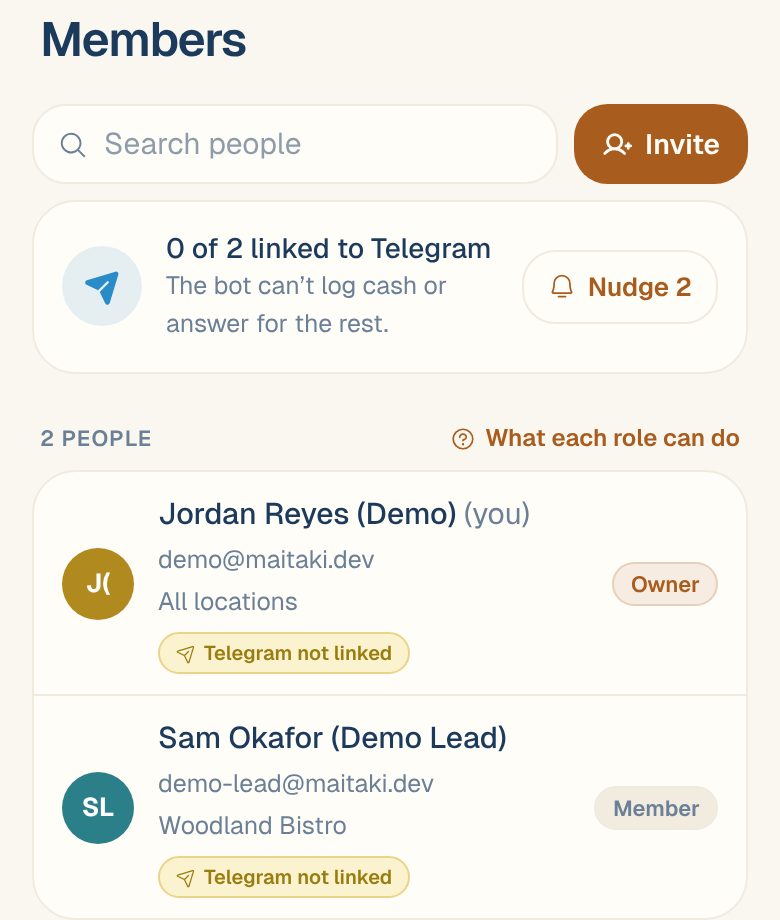
At the top, a card says how many people are linked, for example 3 of 5 linked to Telegram. Each person in the list has a chip: Telegram linked or Telegram not linked.
When everyone is linked, the card says Everyone — the bot knows who’s who.
Nudge the rest
- On the Telegram card, tap Nudge (it shows how many people aren’t linked).
- The Nudge to link Telegram sheet lists everyone who isn’t linked, and a message explaining how to link.
- Send it one of these ways:
- Tap the envelope next to a person to email them the message.
- Tap Copy message and paste it into your team chat.
- On a phone, tap Share to send it with another app.
The message asks them to open their Profile in Maitaki and tap Link my Telegram, or to send @MaitakiBot link me in your team’s group. For the steps they’ll follow, see Link your Telegram.
Common questions
I'm a Manager. Can I see who's linked?
The Telegram card is on Members, which only Admins and the Owner can open. Ask one of them, or share the Link your Telegram article with your team.
Do people have to link Telegram to use Maitaki?
No. The app works without it. Linking only matters for using the bot and your team’s Telegram group.