Statements and past-due reminders
Kept, never counted, and how they reveal missing invoices.
Also known as: statement of account · past due · overdue notice · monthly statement · account summary · balance owing · ar statement · dunning · aging report
Vendors send statements and past-due reminders that list invoices you’ve already been billed for. If Maitaki counted them, you’d pay for the same delivery twice in your numbers. So a statement is kept in the Inbox for reference and never counted as spend. It can still be useful: it shows which invoices you never received.
How a statement shows in the Inbox
A statement shows Statement on the right of its card. When an emailed statement is sorted as it arrives, Maitaki also reads the invoice numbers on it and checks them against Purchases. The card then says, for example:
- Lists 5 invoices · all in Purchases: you have every one.
- Lists 5 invoices · 2 we don’t have: two are missing. This line is highlighted.
Statements are kept under the Other type tab.
Find the invoices you’re missing
- In the Inbox, tap All, then tap the statement. Statements don’t wait under Review, since there’s nothing to verify.
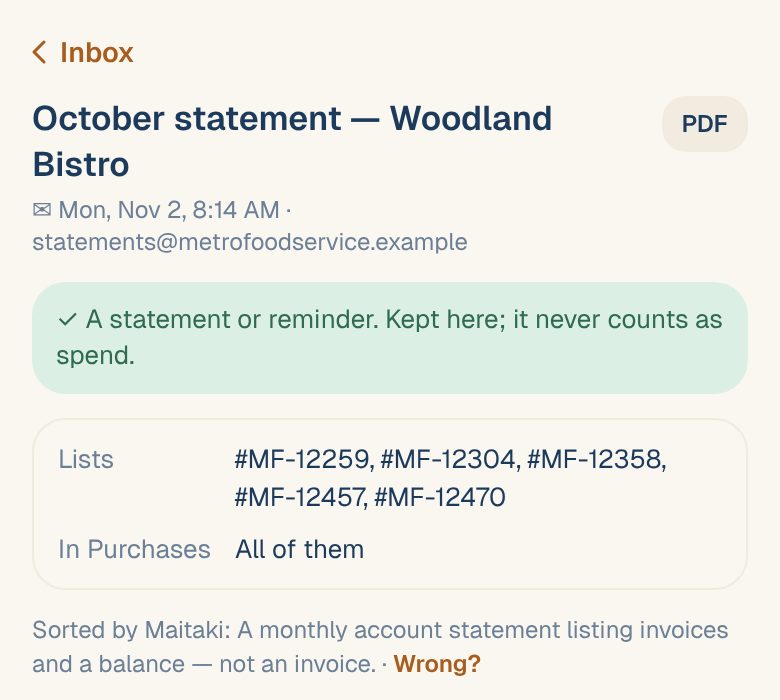
- Under Lists, you’ll see every invoice number on it.
- In Purchases says All of them, or names the ones you don’t have: Not #MF-12304. Forward or upload it so it counts.
- Get a copy of each missing invoice from the vendor, then upload it or forward it to your invoice email address.
See Photograph a delivery invoice or Get an email address for invoices.
Spot gaps before the statement arrives. Each vendor’s page shows delivery days with no invoice. See Spot invoices you haven’t received.
Mark something as a statement
If a statement came in as an invoice, or is waiting at What is it?, tap the chip under its title (or open it) and choose Statement. You’ll see Kept as a statement — it doesn’t count. See Tell Maitaki what a document is.
Managers can make sure a vendor’s statements are always sorted this way with a rule, like Emails with “Past due” in the subject are statements. See Sorting rules for emailed documents.
Common questions
Why doesn't my statement list any invoice numbers?
Maitaki reads the numbers when it sorts an emailed statement as it arrives. A statement you uploaded yourself, or marked as a statement by hand, is kept but not checked against Purchases.
Was a statement read as an invoice by mistake?
Change it to Statement as above. Its invoice is set aside, so it stops counting in your spend. If someone already verified it, unverify it first.